Skip to content

CyberGuard Assessment Tool

Your Microsoft environment's security, in one place.

Automated assessments for Active Directory, Microsoft Entra, Microsoft 365, network and compliance: a score from 0 to 100, the paths an attacker can follow and what to fix first.

The solution

CyberGuard Assessment Tool

CyberGuard Assessment Tool helps organizations assess their Microsoft infrastructure, with a complete view of security, compliance, governance and configuration that goes beyond checking each native console one by one.

It is a web platform that analyzes Active Directory, Microsoft Entra, Microsoft 365, the corporate network and Microsoft Defender data, and connects them. Every check that finds a problem becomes a finding with severity, CVSS score and recommended remediation; findings combine into attack paths and count toward a Security Score from 0 to 100.

Alongside the technical assessments you get compliance questionnaires for NIS2, DORA, GDPR, the AI Act and ISO 27001, the team's work log and PDF reports: everything you need to analyze, fix and prove your security posture from a single interface.

Scores, findings and priorities

The starting point is always the same: a score for each technology, the list of open issues with their remediation, and a dashboard that tells you what needs attention today.

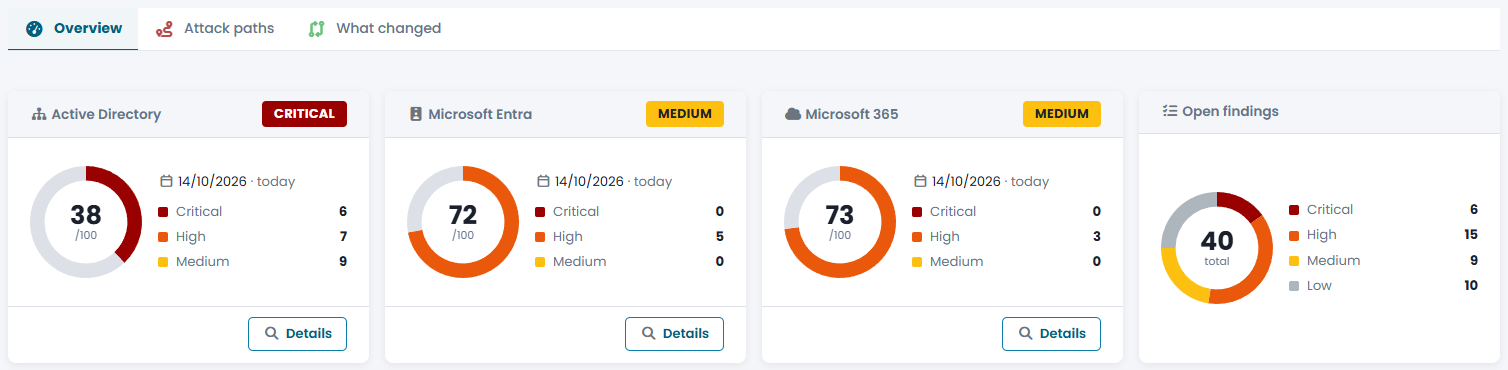
The Security Score brings together the latest Active Directory, Microsoft Entra and Microsoft 365 assessments. For each one you see the score, the risk level and how many critical, high and medium findings are open.

  • Low, Medium, High or Critical risk level
  • Assessment date, with a warning if it is more than 30 days old
  • Total open findings by severity

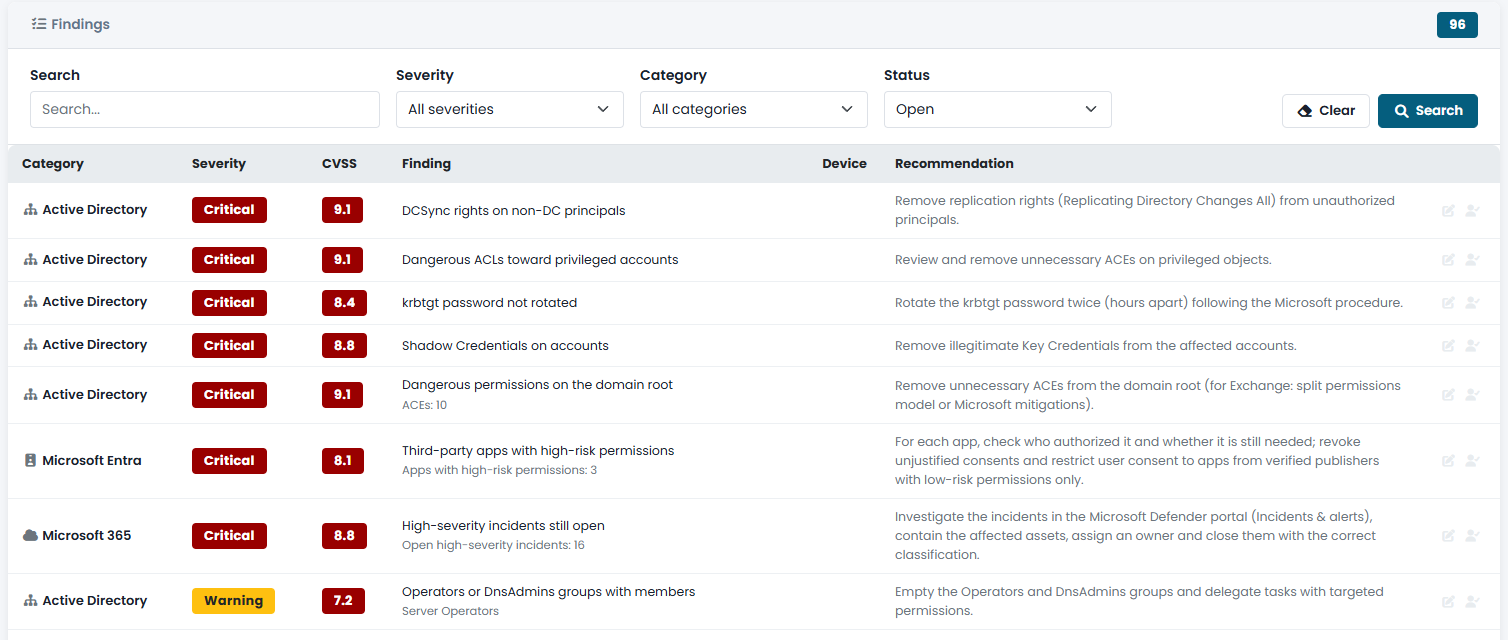
Every issue detected is a finding: what was found, which objects are affected, the CVSS score and the recommended fix. One list for all technologies, filterable by severity, category and status.

  • Affected objects for each finding (accounts, DCs, templates, policies)
  • Recommended remediation in practical language
  • Filters by text, severity, category and status

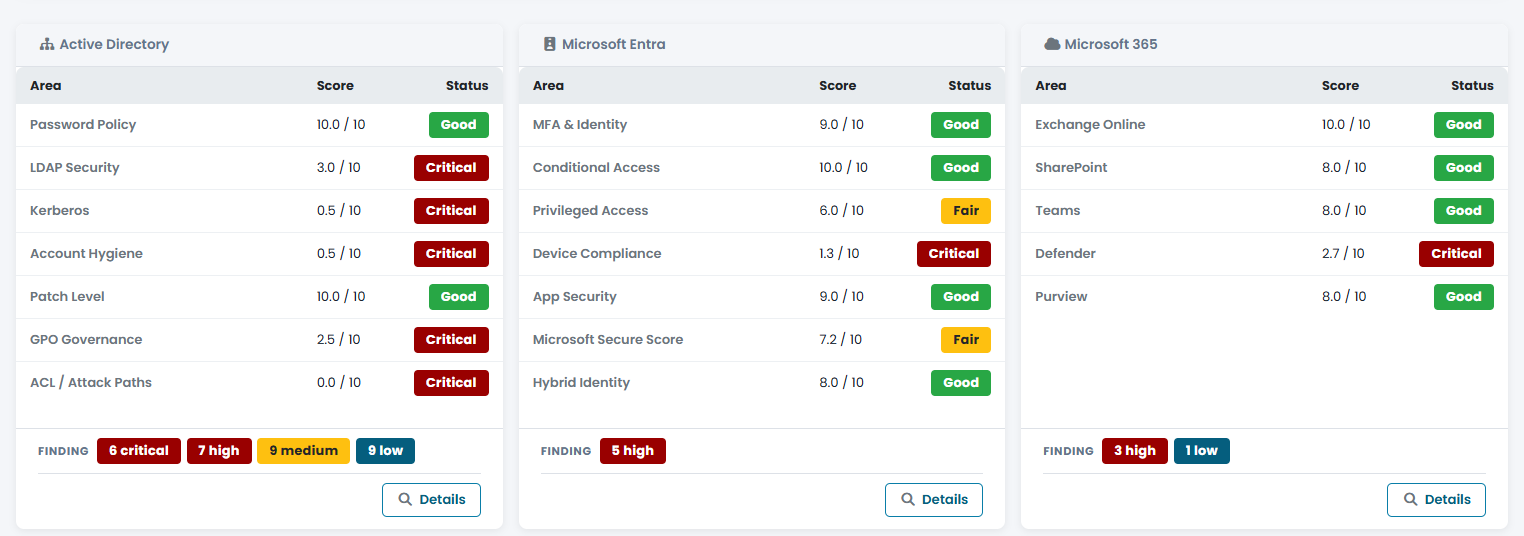
Each technology is split into its own areas — Password Policy, Kerberos and Account Hygiene for Active Directory; Conditional Access and Privileged Access for Entra; Exchange Online and Teams for Microsoft 365 — each rated from 0 to 10.

  • Good, Fair, Attention or Critical status for each area
  • Security posture chart across the three technologies
  • Clear priorities for the remediation plan

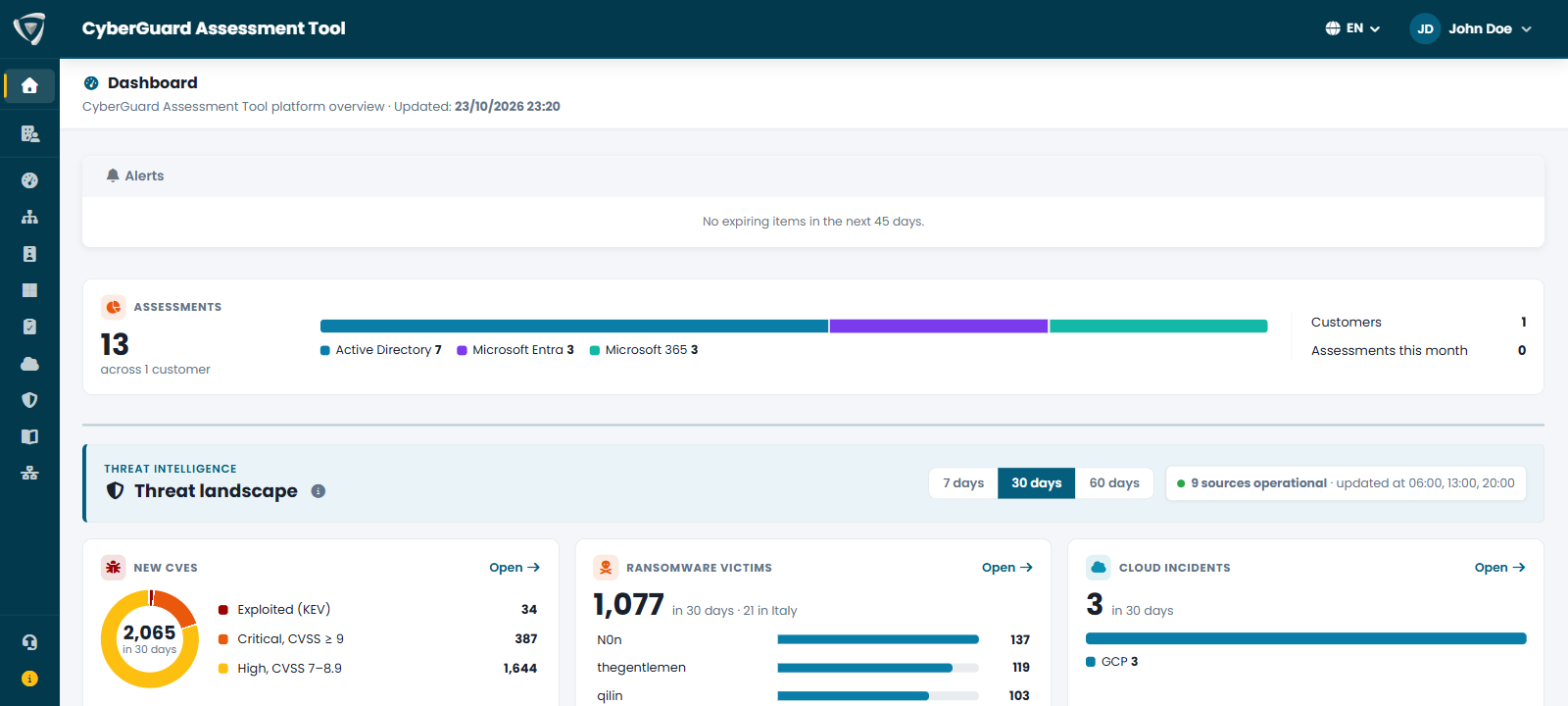
The first page after sign-in collects your alerts: missing configuration, deadlines to manage, ransomware attacks in your sector and DDoS attacks on your websites in the last 7 days, and team activities stalled for too long. A single indicator summarizes your assessments, split by Active Directory, Microsoft Entra and Microsoft 365.

  • Alerts with a link to the page to fix
  • Ransomware in your sector and DDoS attacks on the websites listed in your company profile
  • Total assessments, by area and for the month

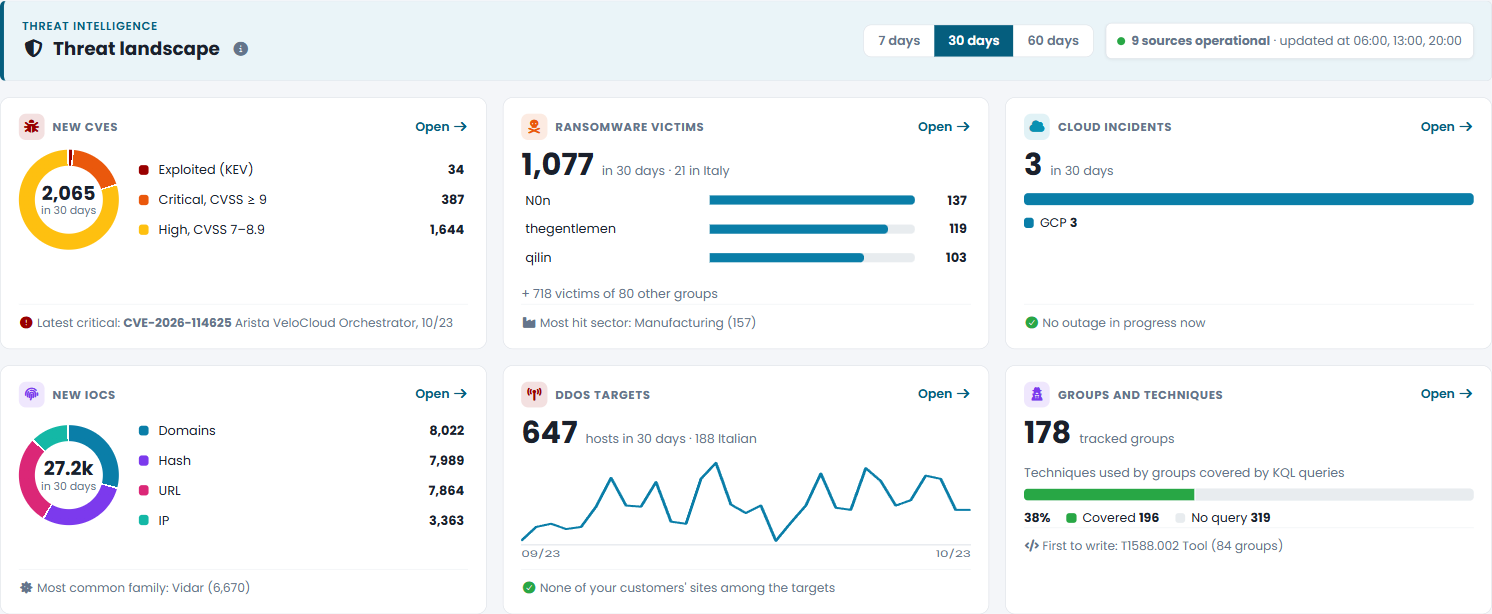
The threat landscape from public threat intelligence sources, over the last 7, 30 or 60 days: six indicators that show what each number is made of, the period's events with those that concern you at the top, exploited vulnerabilities and newly published critical CVEs, threat groups, campaigns, MITRE ATT&CK techniques, ransomware victims, DDoS targets, IOCs and cloud service status.

  • Critical CVEs visible even before they enter the KEV catalog
  • DDoS targets of NoName057(16), with an alert if one of your sites appears
  • Charts that filter the tables with one click

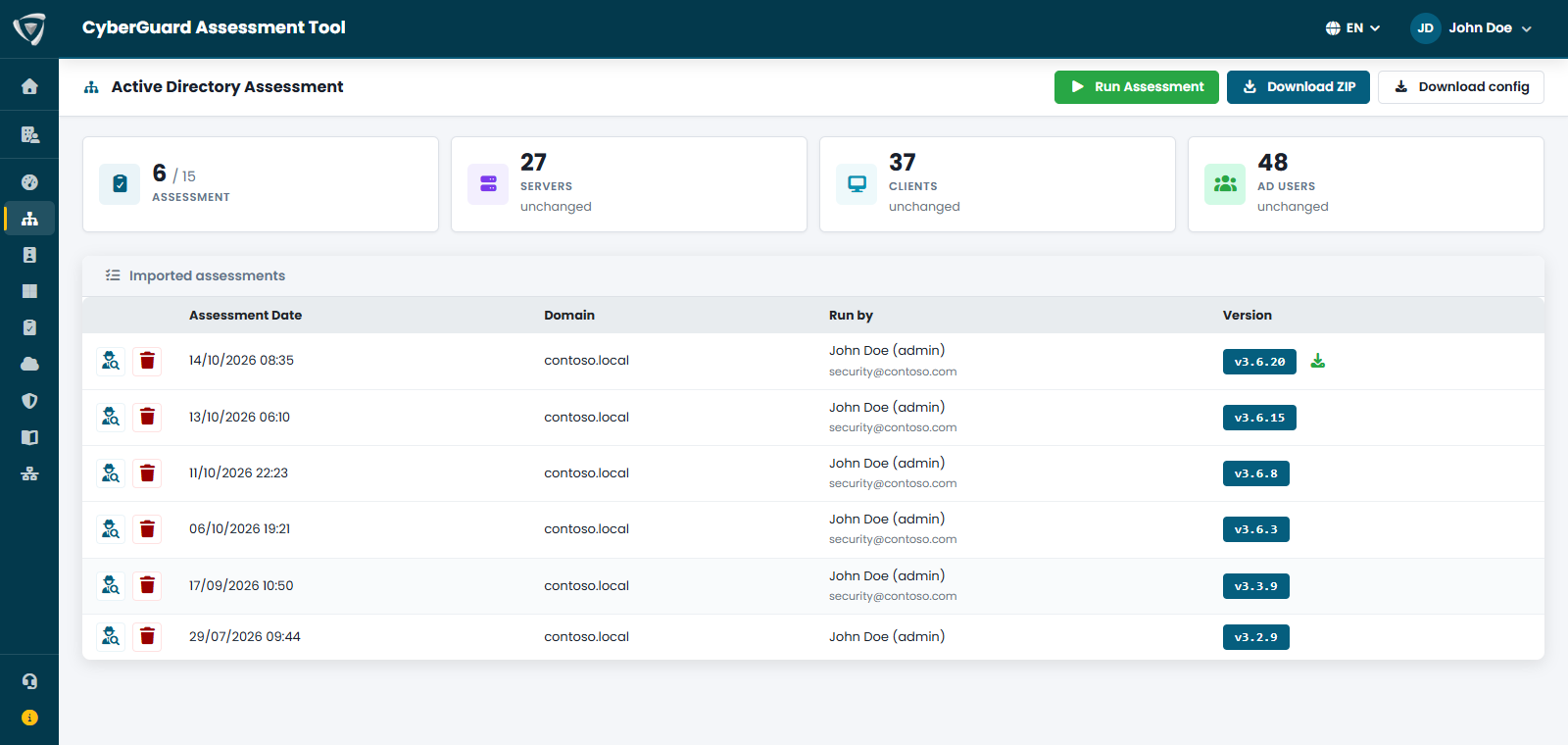
Every assessment stays in the history with its date and score. The PDF report, in Italian or English, contains the score, findings, action plan and accepted risks; the collected lists can be exported to CSV.

  • PDF reports in Italian and English
  • CSV export for Excel or SIEM
  • Lock an assessment as a baseline to keep
CyberGuard Security Score with Active Directory, Microsoft Entra and Microsoft 365 scores and open findings by severity List of security findings with severity, CVSS score, affected objects and recommended remediation Security score by area: Password Policy, Kerberos, Account Hygiene, Conditional Access, Exchange Online CyberGuard dashboard with alerts, assessment indicator for Active Directory, Microsoft Entra and Microsoft 365 and threat landscape Threat intelligence on the dashboard: new CVEs, ransomware victims, cloud incidents, IOCs, DDoS targets, groups and MITRE ATT&CK techniques Assessment history with date, score and PDF report export
One place for security and compliance

On-premises and cloud identities, collaboration, devices, network, Microsoft Defender data and regulatory requirements usually live in separate consoles and spreadsheets. CyberGuard puts them side by side: from the finding to the attack path, from the remediation to the proof it worked, all the way to the documentation for a NIS2 audit. It is where your company governs security and compliance.

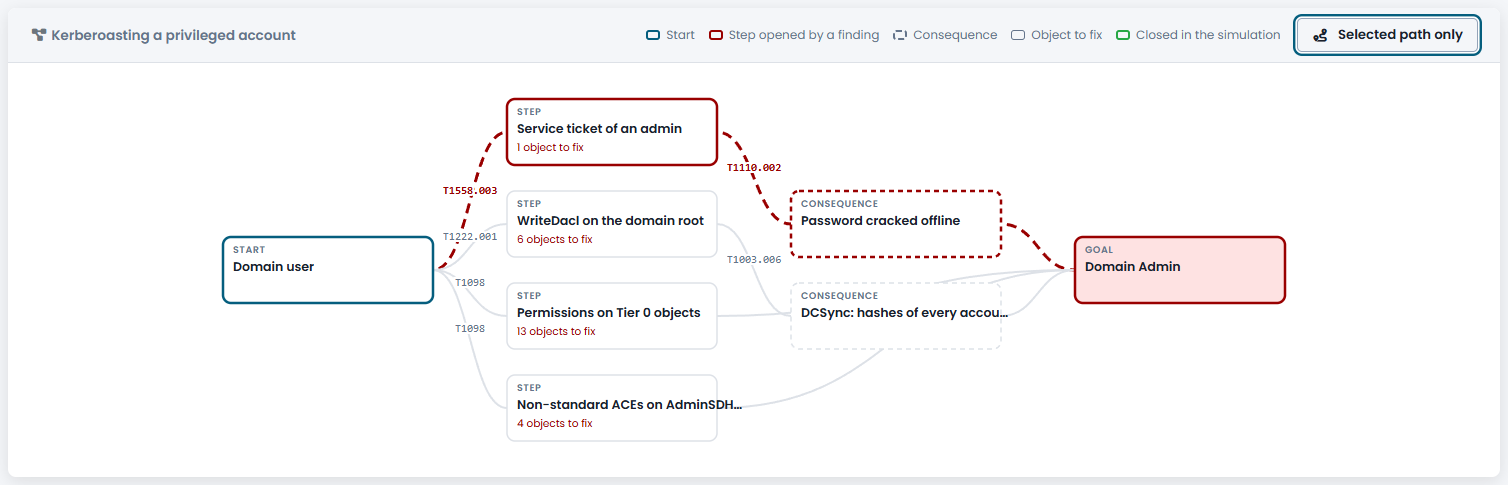
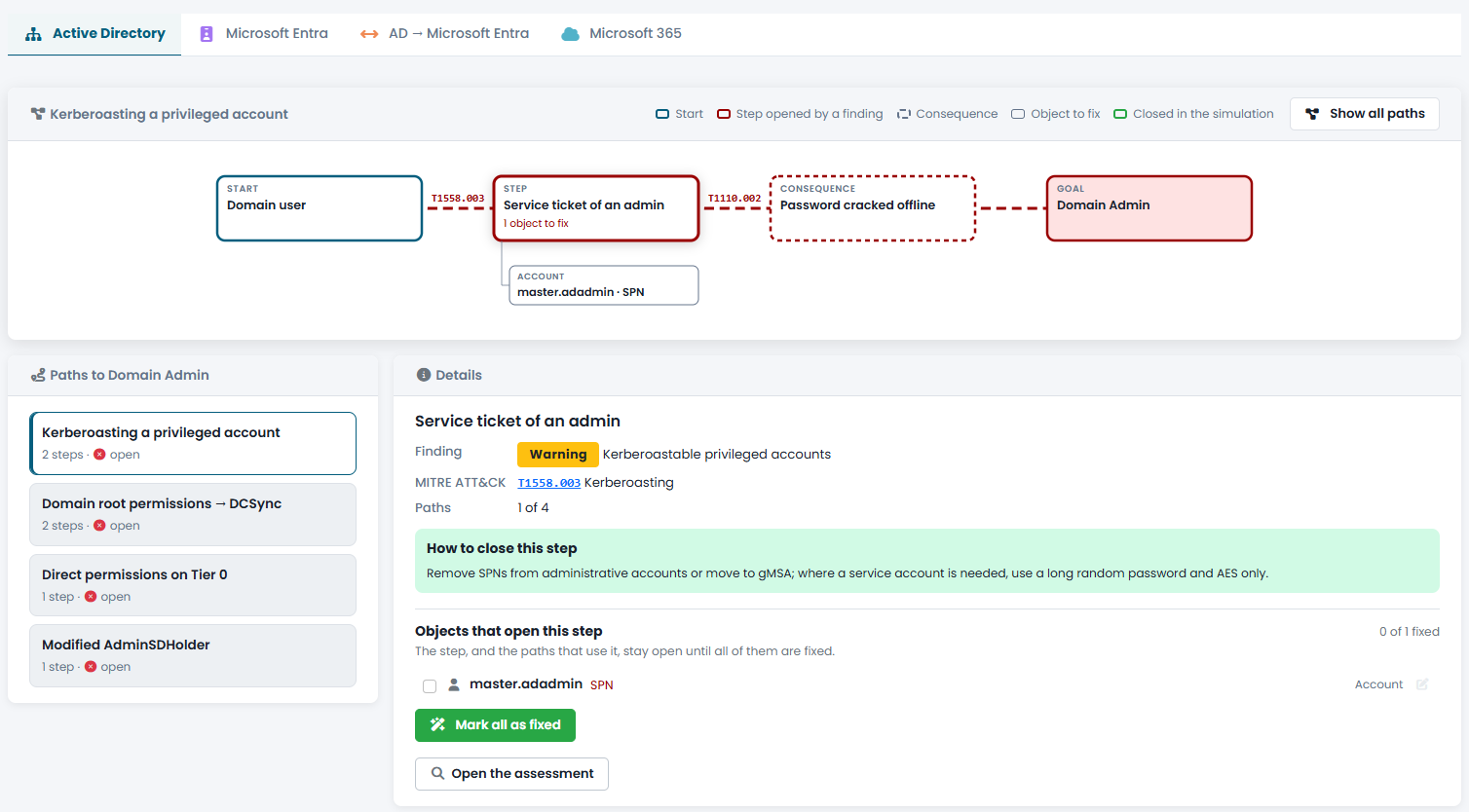
Attackers chain weaknesses together. CyberGuard builds attack paths from open findings: from a domain user to Domain Admin, from a compromised identity to Global Administrator, from on-premises AD to the cloud, all the way to Microsoft 365 mail and files.

  • Every step with its MITRE ATT&CK technique and the objects to fix
  • Hybrid AD → Entra paths: Seamless SSO, AD FS, synced admins
  • Steps shared by several paths: one fix closes them all

Mark a step's objects as fixed and see which paths break. The simulation saves nothing and changes nothing: it helps you pick the fix with the biggest impact.

  • Step closed in the simulation and paths broken
  • No changes to your environment
  • Real result confirmed by the next assessment

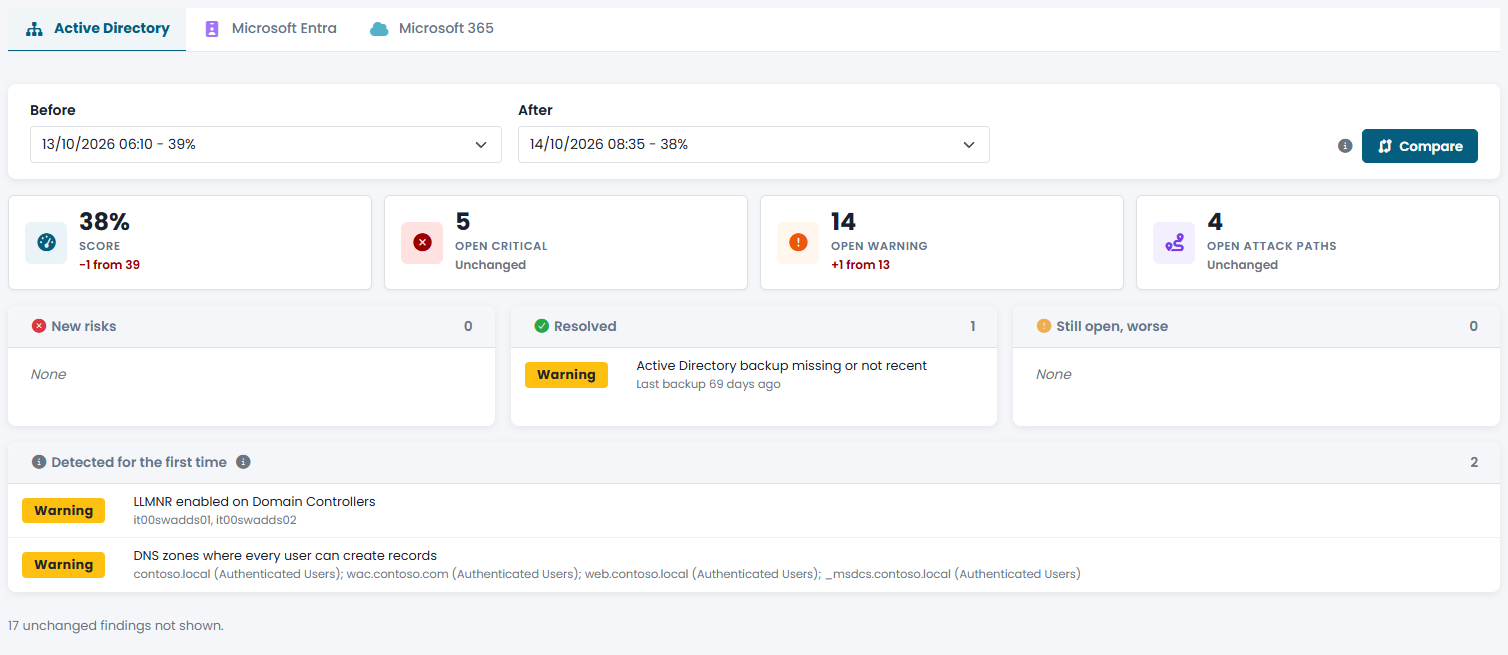
Compare two assessments of the same technology: new risks, resolved findings, worsened findings and new checks. It is the proof that the remediation work paid off, ready for periodic review.

  • Change in score, critical findings and open attack paths
  • Both assessments evaluated with today's rules
  • Ideal after remediation or for quarterly reviews

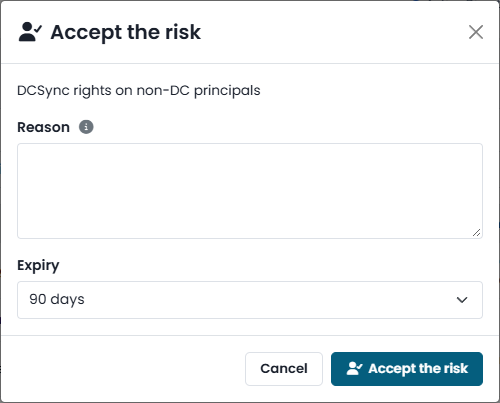
When a finding cannot be fixed, an administrator can accept the risk by stating the reason and compensating controls for 30, 90, 180 or 365 days. The score does not change, the report lists it separately and when it expires the finding reopens.

  • Documented justification and compensating controls
  • Dedicated report section for audits
  • The step stays visible in attack paths

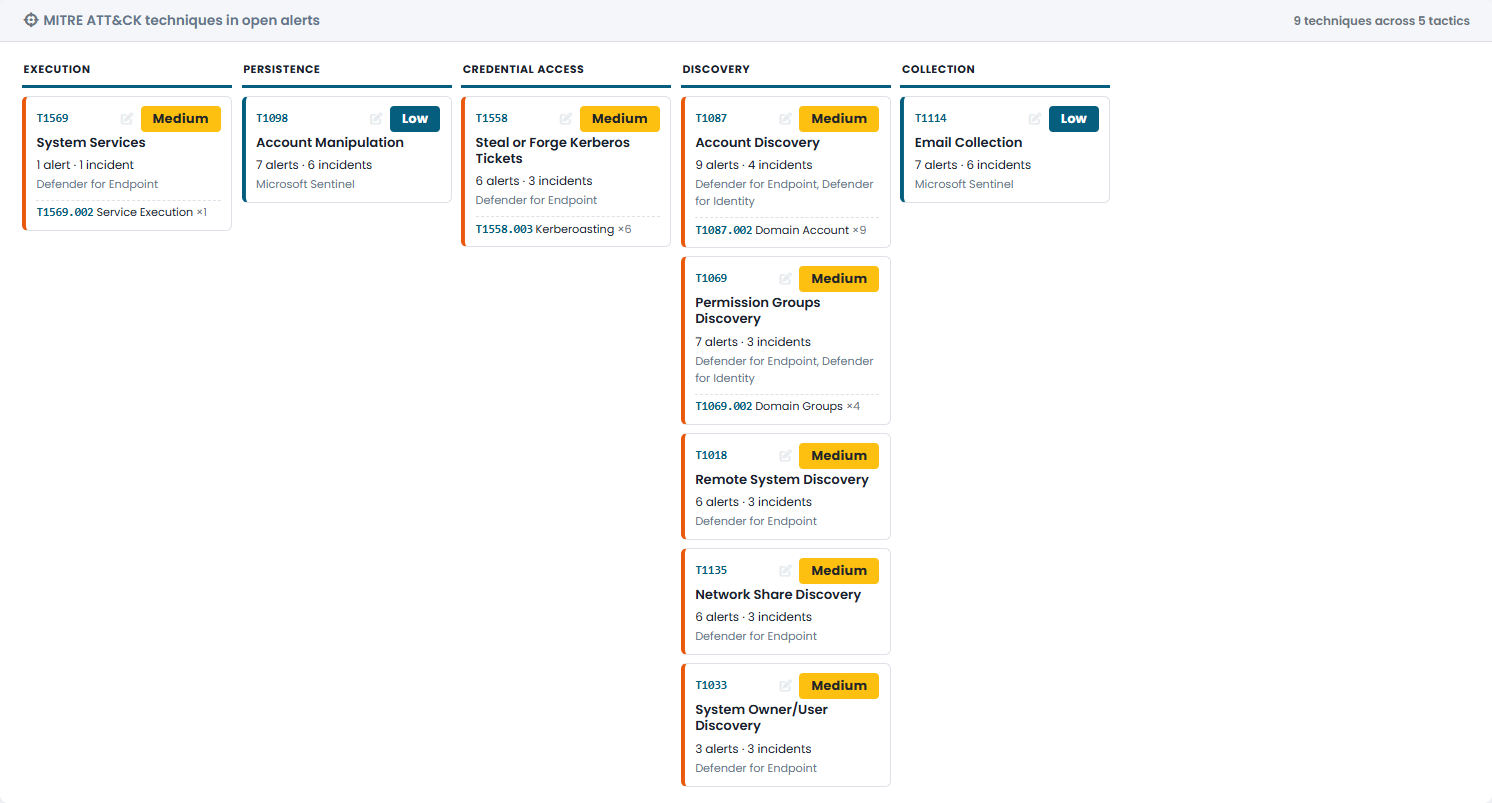
Microsoft Defender XDR incidents and alerts from the last 30 days, ordered by MITRE ATT&CK tactic, with full details for each incident: alerts, involved entities, actions recommended by Microsoft and timeline. Software vulnerabilities with public exploits detected by Defender on your devices, with those actively exploited and used by ransomware at the top. Read-only.

  • Alerts from Defender for Endpoint, Identity, Office 365 and Sentinel
  • Incident details without opening the Defender portal
  • Exploited vulnerabilities (CISA KEV) and exploitation probability (EPSS) up front

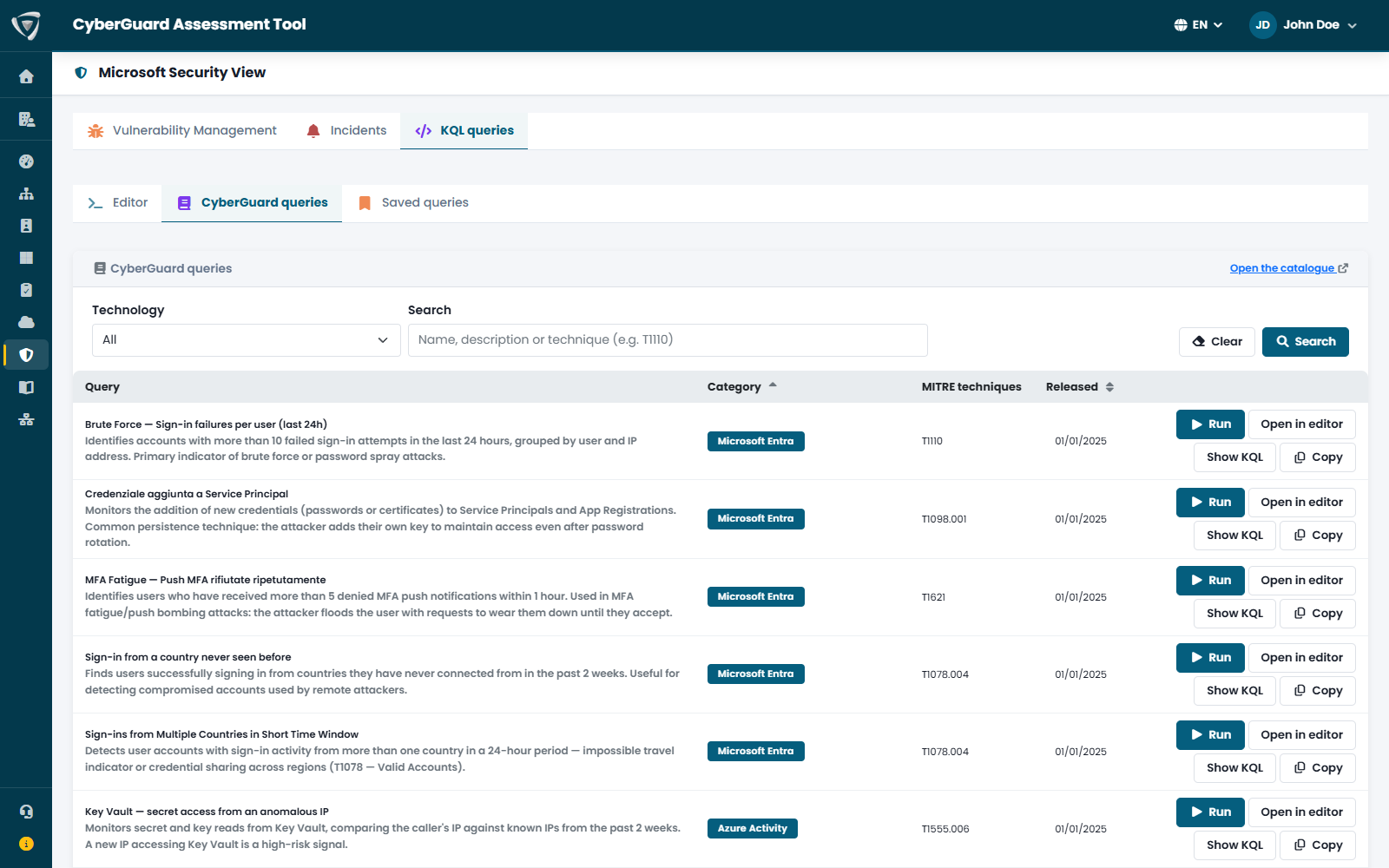
Run KQL Advanced Hunting queries on Microsoft Defender XDR and Microsoft Sentinel data directly from CyberGuard, read-only. A catalog of queries curated by Inside Technologies and mapped to MITRE ATT&CK is ready to use.

  • Query catalog for Entra, AD, Exchange, Defender and firewalls
  • CSV export and saving to the team workspace
  • Public repository on GitHub

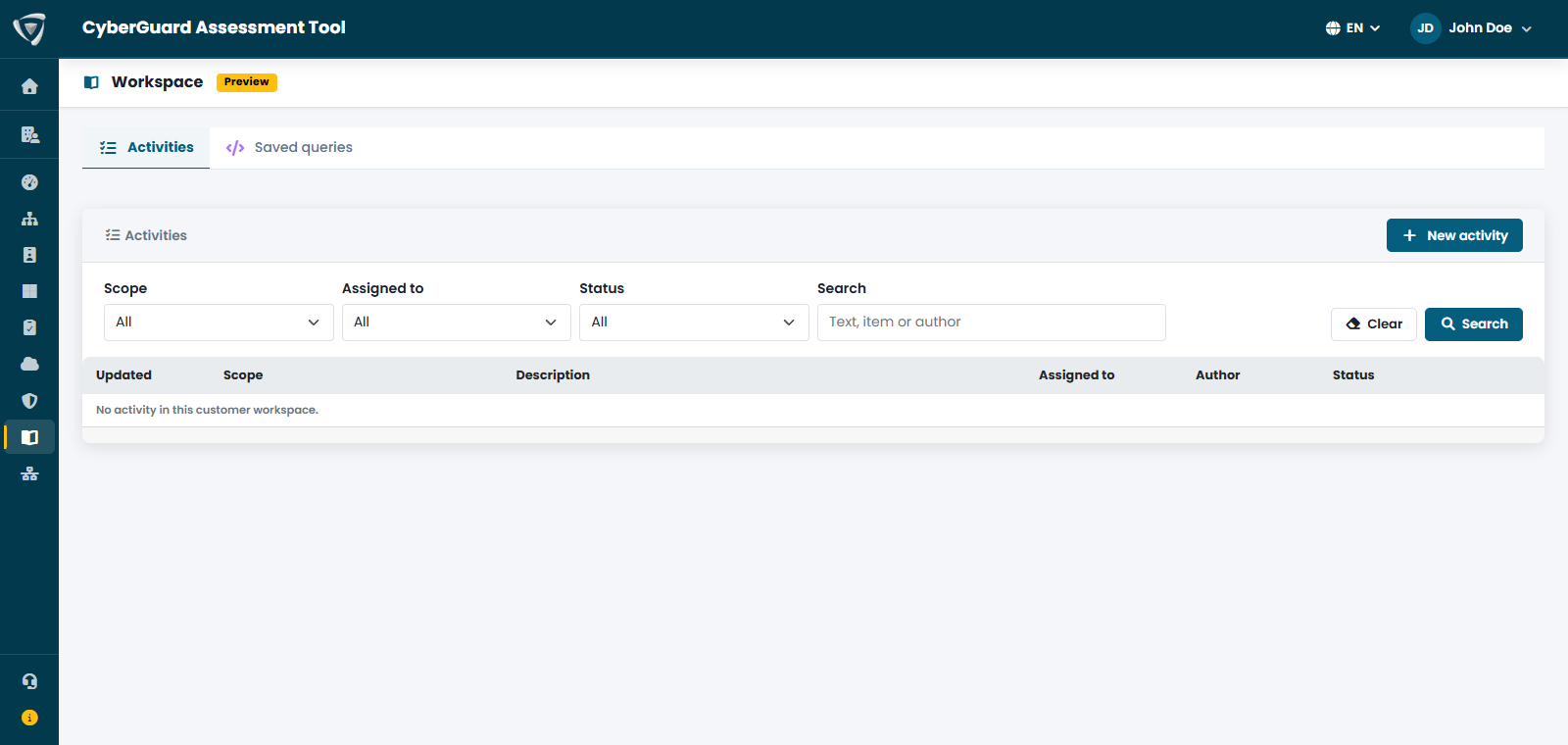
The Workspace records what the team has done: how an incident was handled, the decision on a finding, investigation notes, queries worth keeping. Every activity has an author, an owner and a status, and stays linked to the data it refers to.

  • "Document in workspace" from findings, paths and incidents
  • Alert for activities stalled for more than 7 days
  • Weekly email summary every Monday

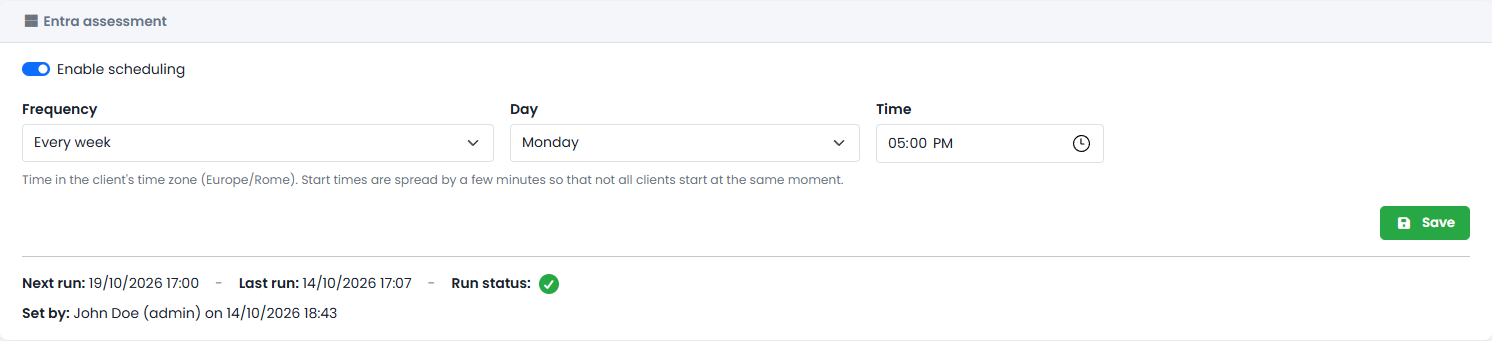
Schedule assessments daily, every N days or weekly: the Security Score stays up to date without anyone having to remember it, and notifications come from your own mail server.

  • Scheduling for Active Directory, Microsoft Entra and Microsoft 365
  • Frequency and time of your choice
  • Email for completed or failed assessments
Attack path map from Domain User to Domain Admin with MITRE ATT&CK techniques such as Kerberoasting and DCSync Simulation of a fix that breaks an Active Directory attack path Comparison of two assessments with new risks, resolved findings and change in Security Score Accepting a finding's risk with justification, compensating controls and duration MITRE ATT&CK techniques in open Microsoft Defender XDR alerts ordered by attack stage Catalog of KQL threat hunting queries for Microsoft Defender XDR mapped to MITRE ATT&CK Team Workspace with open and resolved activities on findings, incidents and compliance Automatic scheduling of the Microsoft Entra assessment with frequency and time

Active Directory security assessment

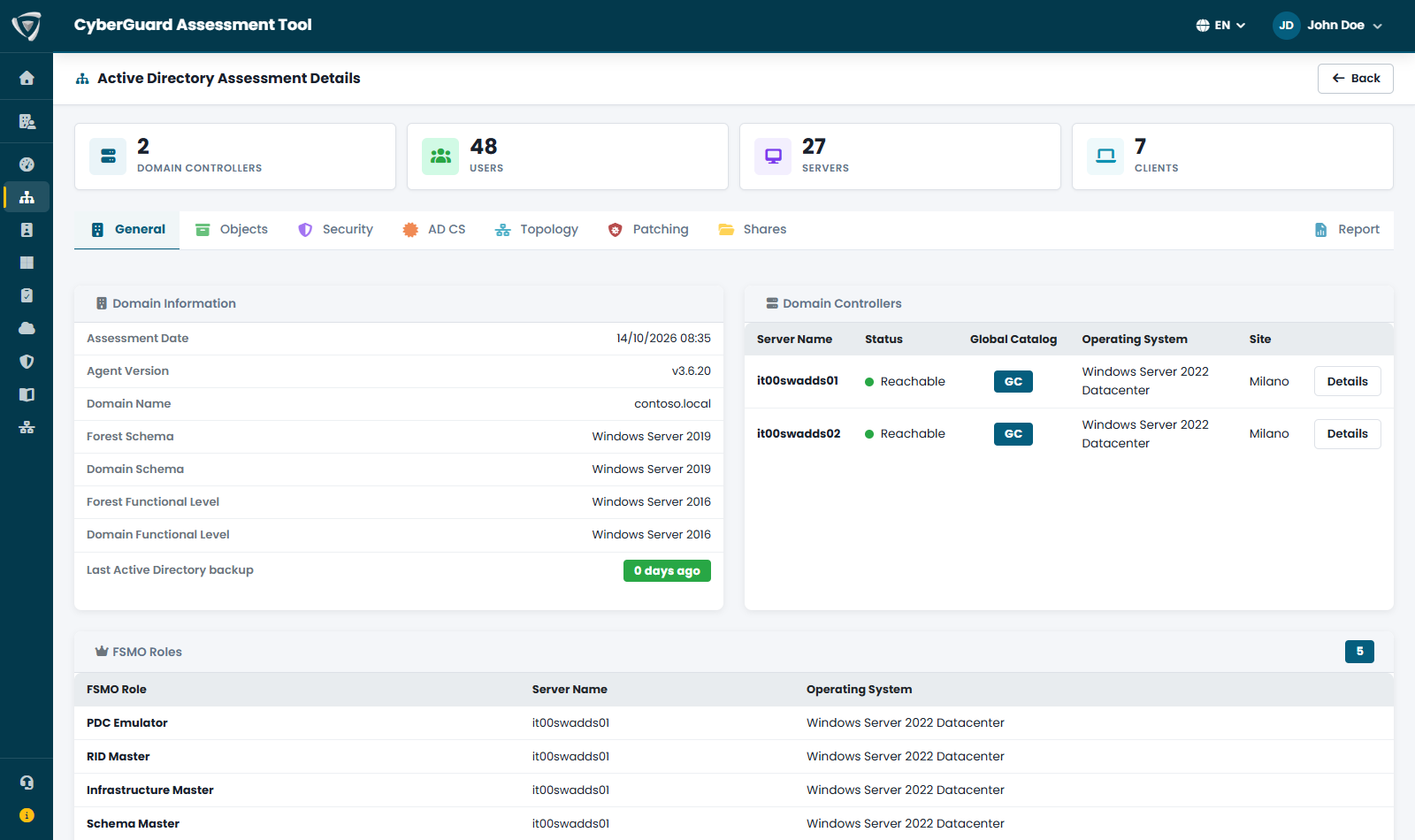
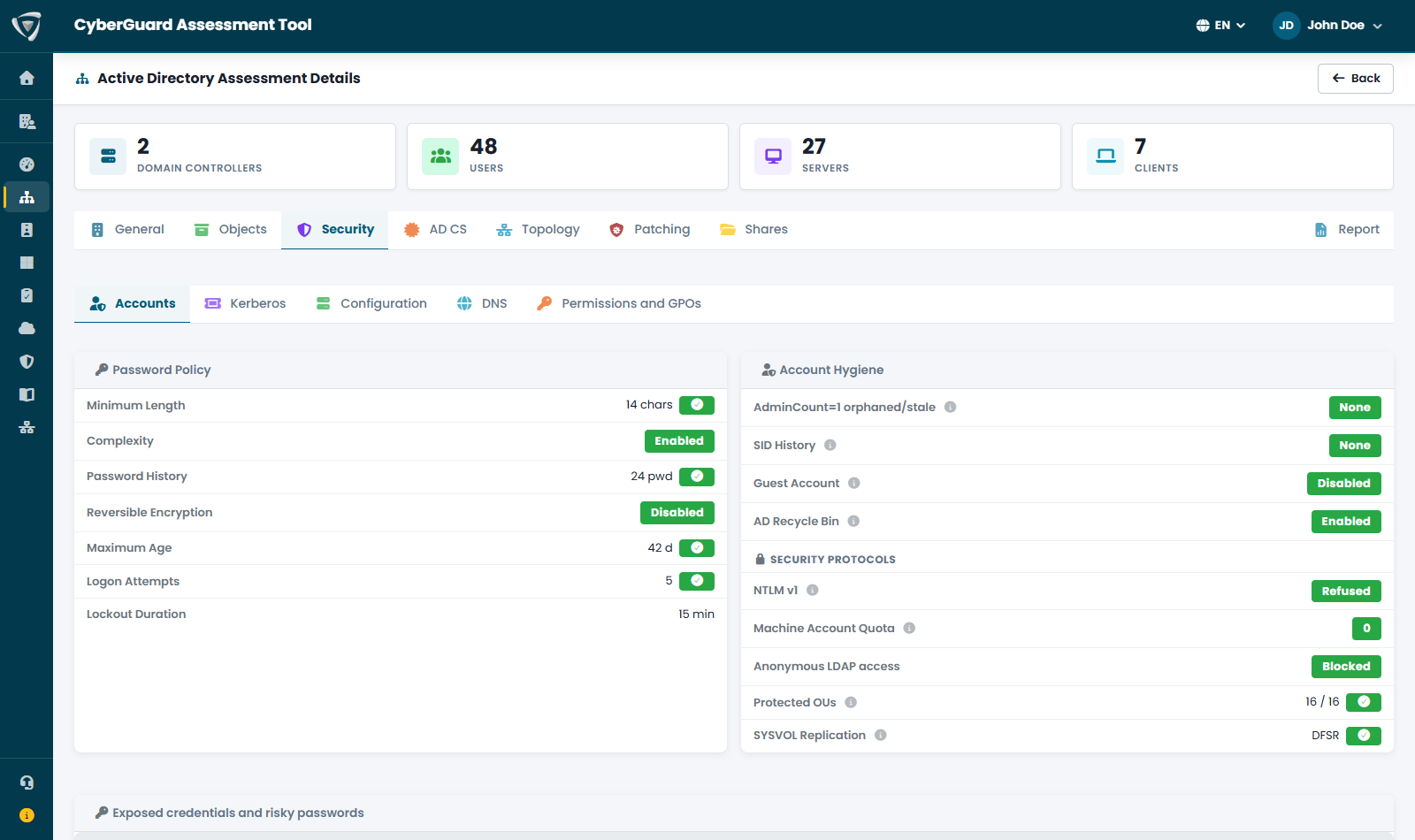
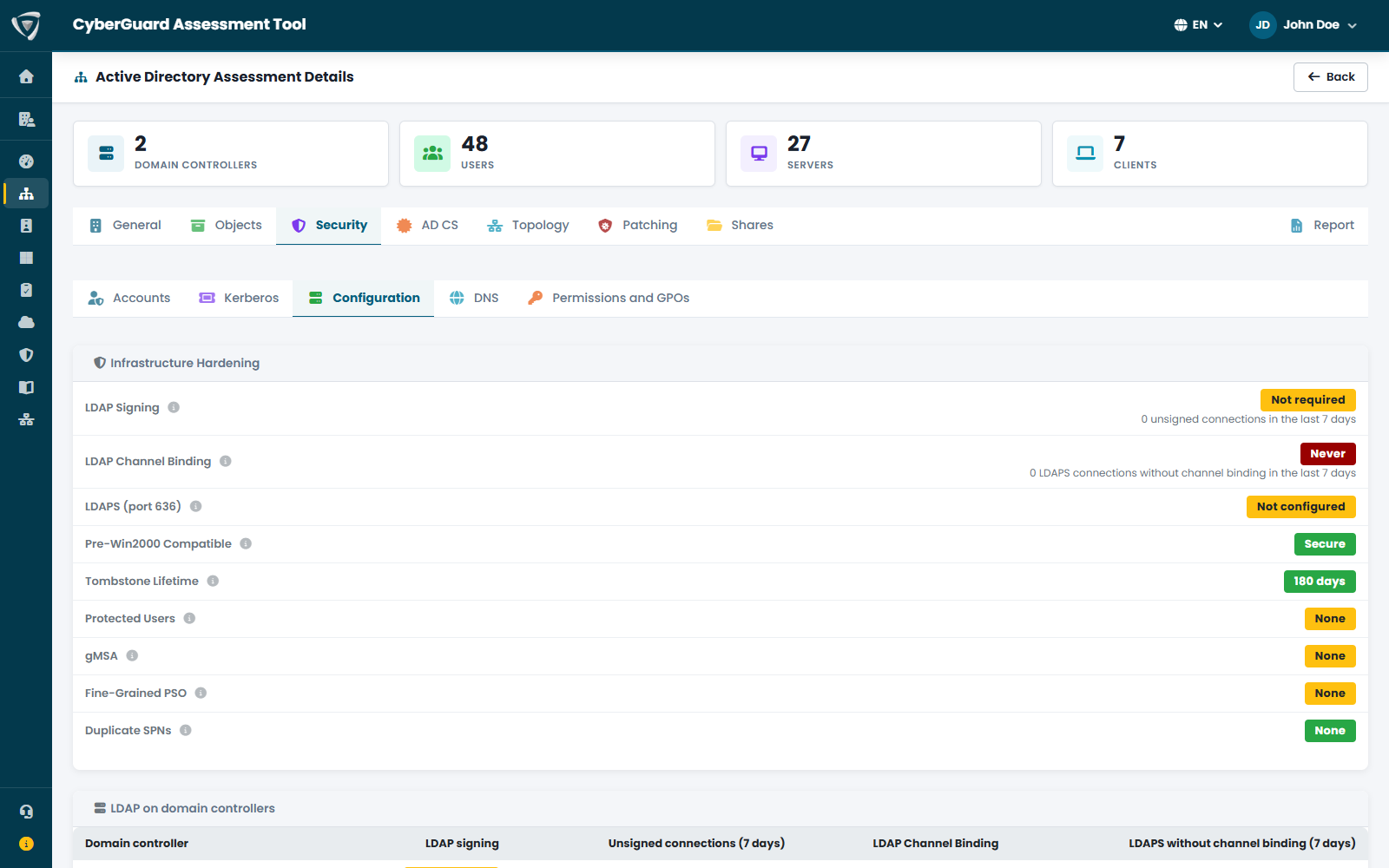
The Active Directory assessment analyzes on-premises domains: how they are built, how healthy the domain controllers are, which accounts and permissions expose them, and how well Kerberos, DNS and Active Directory Certificate Services are protected.

Functional levels, last Active Directory backup, forest domains and trusts. For each domain controller: reachability, uptime and pending restarts, time source, memory, CPU and disks, AD services, database size and LDAPS certificate.

  • FSMO roles, Global Catalog and RODCs
  • Green, yellow (replication errors) or red status for each DC
  • Last Active Directory backup

Password policy, account hygiene, privileged accounts and exposed credentials. On the Kerberos side: unconstrained delegation, Kerberoastable and AS-REP roastable accounts, weak encryption such as RC4 and KRBTGT password age.

  • Privileged groups, AdminSDHolder and orphaned AdminCount
  • Kerberos delegation, SID History and Shadow Credentials
  • LAPS coverage and accounts without AES

The security settings of every domain controller: network protections, NTLMv1, LDAP signing and channel binding, anonymous LDAP, Print Spooler, audit policy. For AD-integrated DNS: dynamic updates, who can create records (ADIDNS), WPAD and wildcard records, forwarders and zone transfers.

  • Authentication coercion and LLMNR
  • Domain controller audit policy
  • WPAD blocklist and ServerLevelPluginDll

Who holds dangerous rights on the domain root and on Tier 0 objects, who can run DCSync, and which Group Policies and SYSVOL scripts expose the domain. Permissions that open an attack path link directly to the map.

  • WriteDacl, GenericAll and replication rights
  • Non-standard ACEs on AdminSDHolder
  • GPOs and logon scripts to review

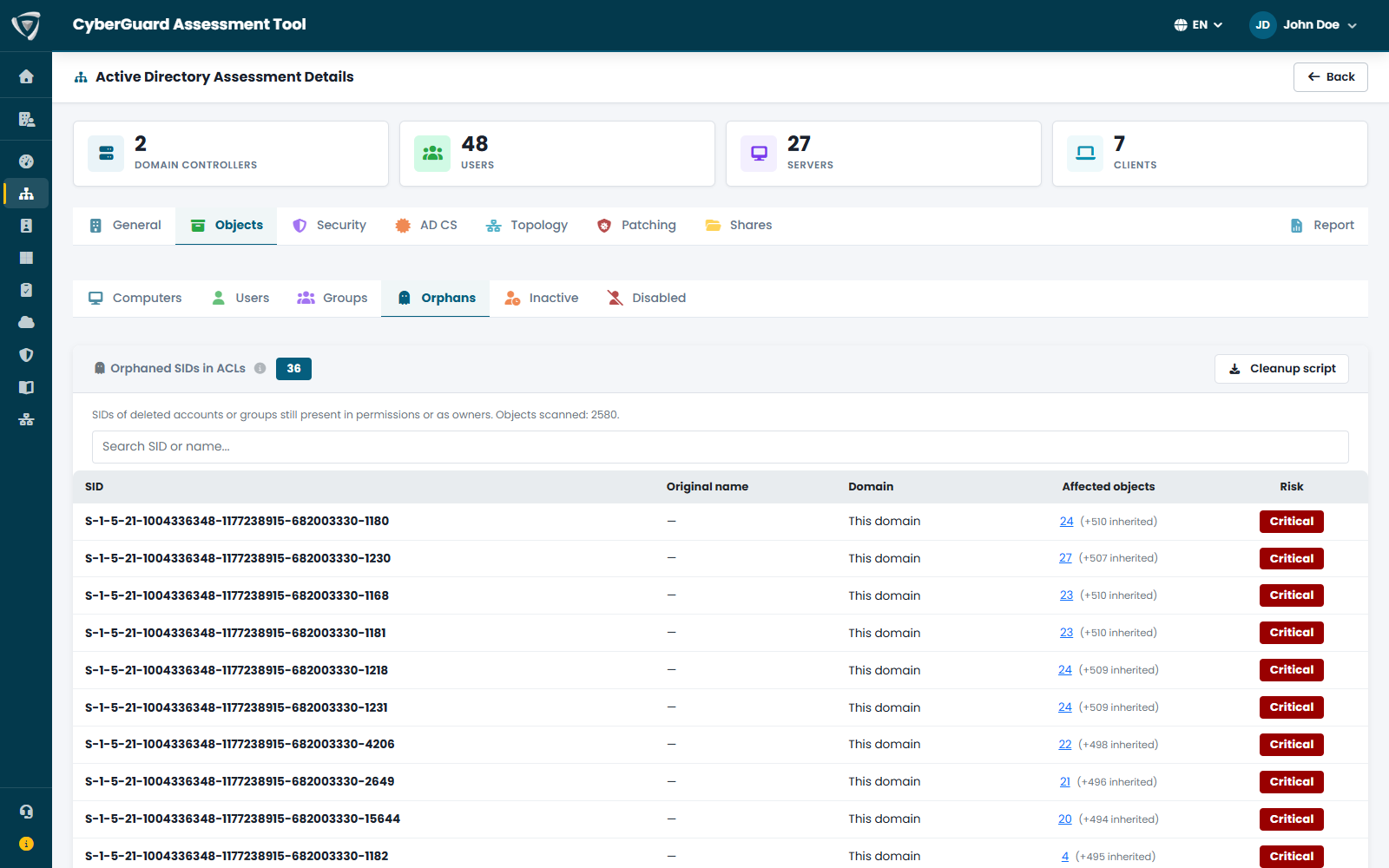
Users and computers that have not signed in for months, disabled accounts never removed, objects and SIDs orphaned by deletions and migrations: the attack surface that grows silently, with the list of objects to clean up.

  • Inactive users and computers with their last sign-in date
  • Disabled accounts to remove
  • Orphaned objects and SIDs to remove

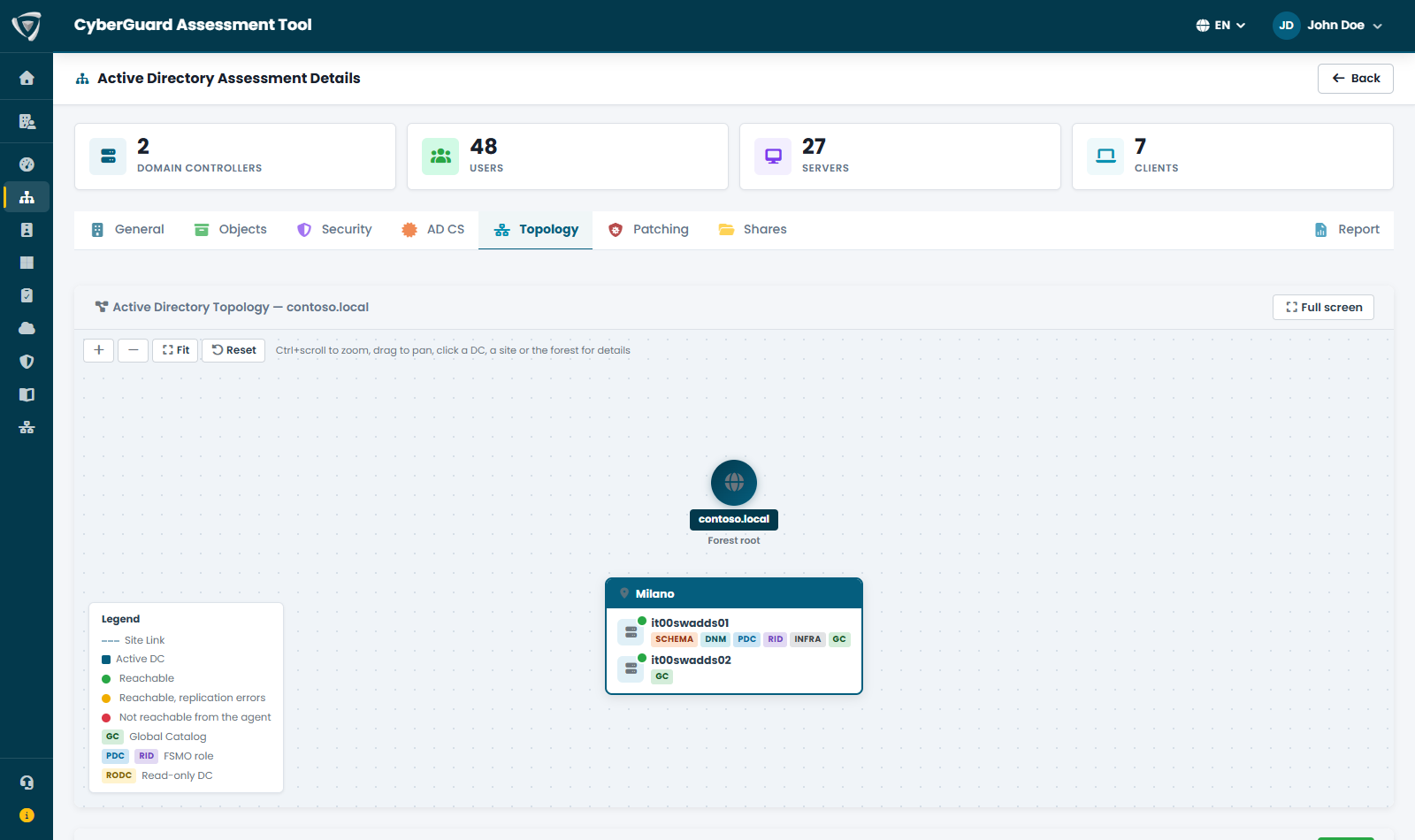
An interactive map of the forest, sites and domain controllers with FSMO roles, Global Catalog and RODCs. The replication matrix shows the status between every pair of DCs and the leftovers to clean up: decommissioned DCs, sites without subnets and the like.

  • Details of any DC, site and forest with one click
  • Replication partners and site links
  • Leftovers to clean up: decommissioned DCs and sites without subnets

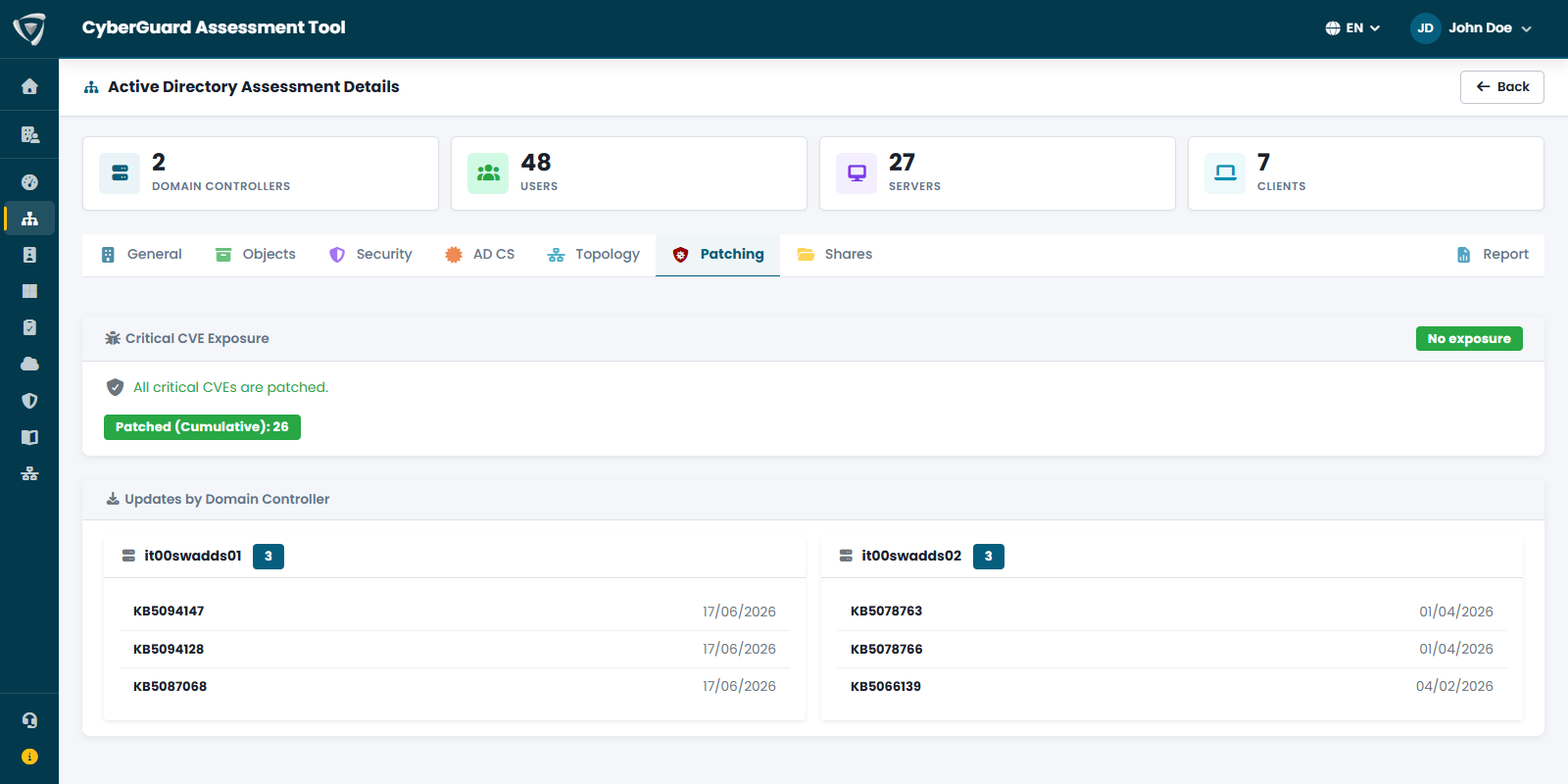
Exposure to critical vulnerabilities and the updates installed on each domain controller; network shares published by domain servers, with their paths, searchable by server.

  • Critical CVEs on domain controllers
  • Updates installed per DC
  • Network shares inventoried
Active Directory assessment: forest, domains, trusts and domain controller health Active Directory security checks on password policy, privileged accounts, Kerberoasting and AS-REP roasting Domain controller security configuration: LDAP signing, channel binding, LDAPS, Protected Users and gMSA Details of an Active Directory attack step with MITRE ATT&CK technique and objects with permissions to fix Orphaned SIDs in Active Directory permissions with affected objects and risk level Interactive Active Directory topology map with forest, sites, domain controllers and replication Exposure to critical CVEs and updates installed on domain controllers

Microsoft Entra security assessment

The Microsoft Entra assessment analyzes your cloud identity tenant: users and groups, applications and permissions, privileged roles, Conditional Access and the signs that someone may already be abusing your identities.

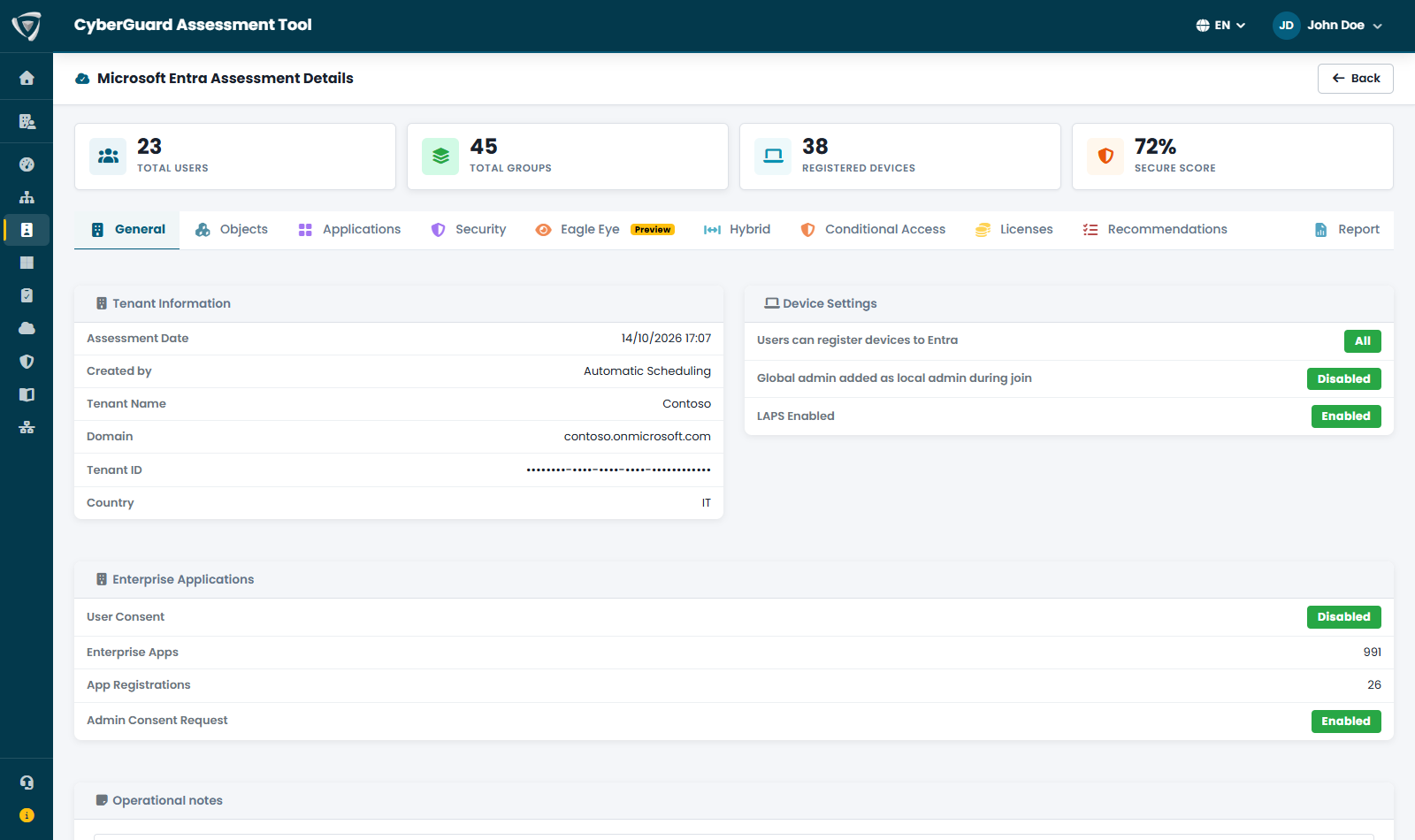
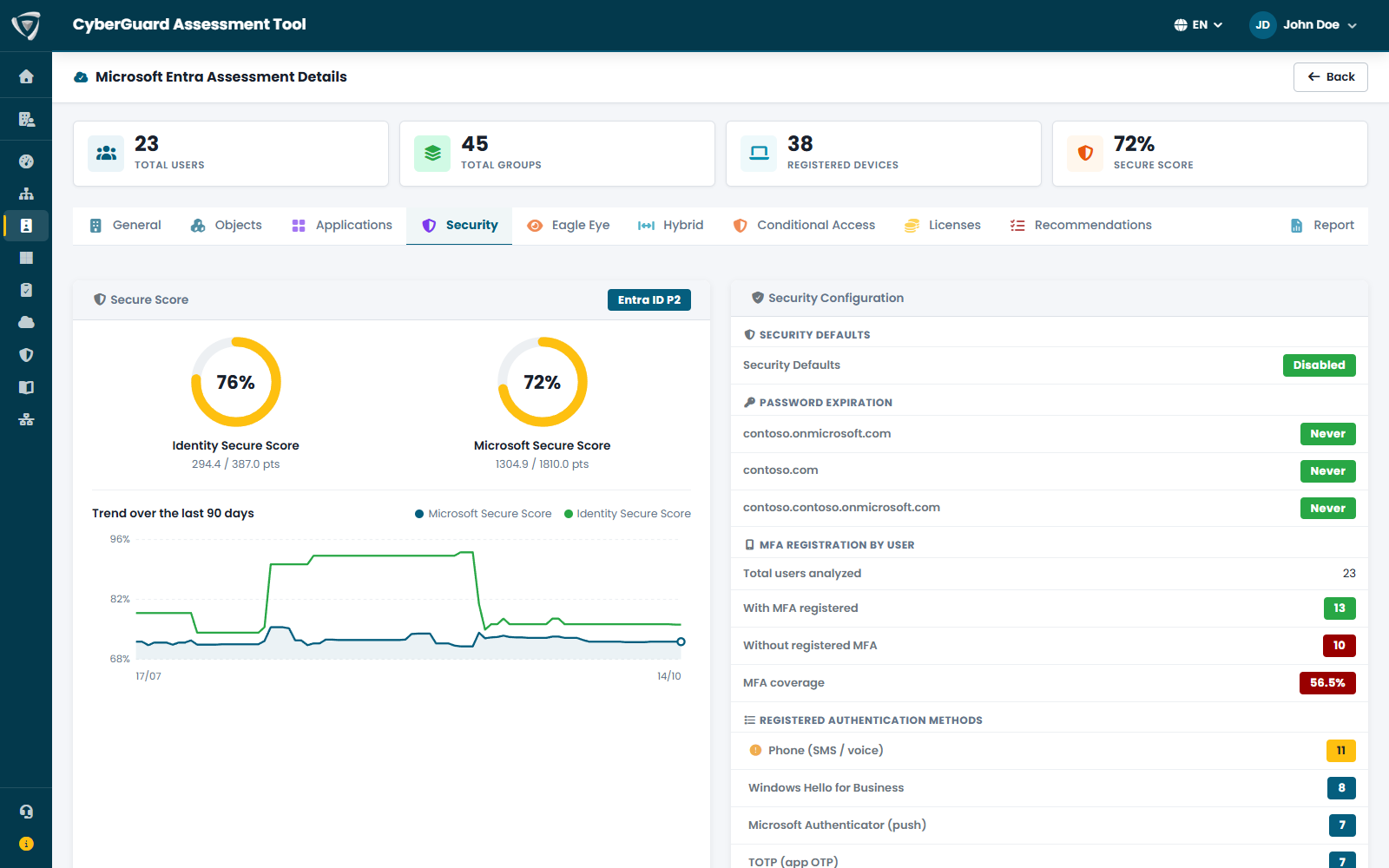
Users, groups, registered devices and Microsoft Secure Score at the top of the page; below, device settings, user and admin consent, inactive users and guests with the licenses they still consume.

  • Identity and Microsoft Secure Score with a 90-day trend
  • Users inactive for more than 90 days and wasted licenses
  • Identity Secure Score recommendations by priority

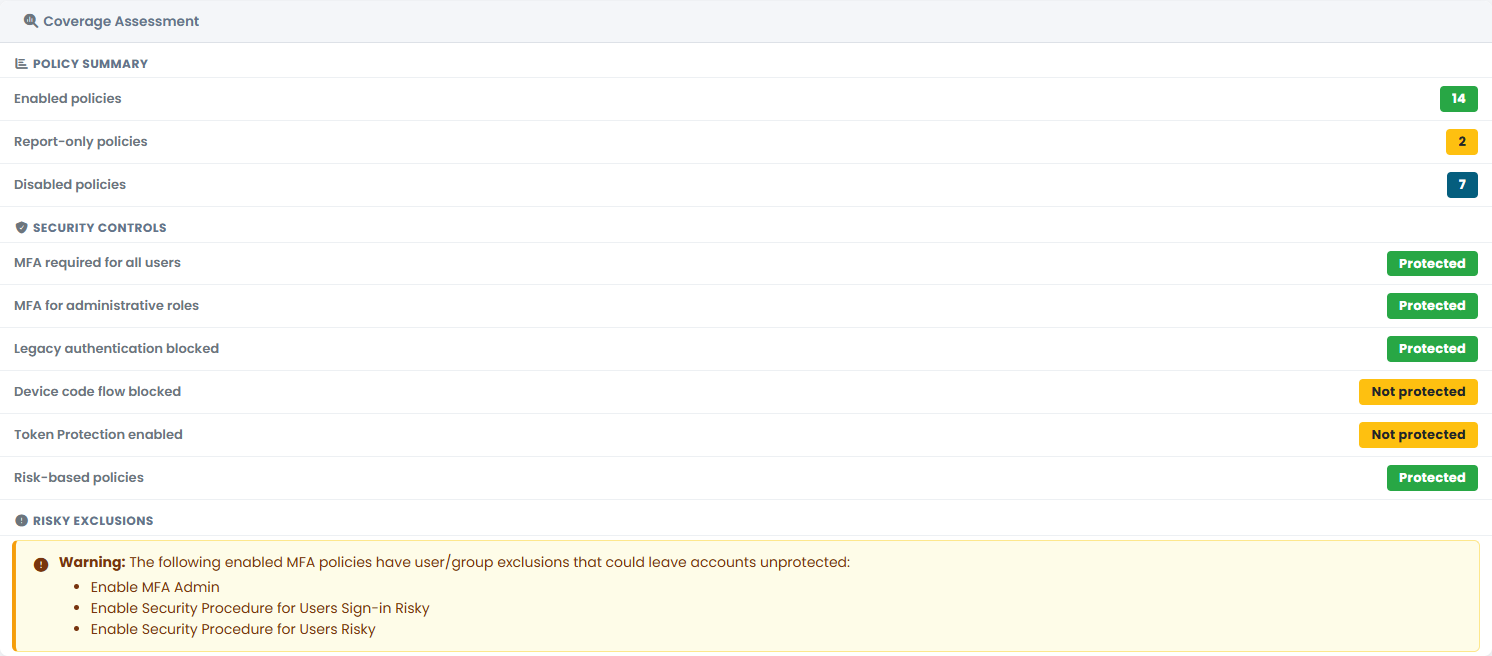
Instead of making you read every policy, CyberGuard checks whether the protections that matter are really there: MFA for everyone and for administrators, blocking of legacy authentication and device code flow, Token Protection, risk-based policies.

  • Warning on MFA policies with dangerous exclusions
  • Emergency access (break-glass) accounts declared and verified
  • Warning if a break-glass account is no longer Global Administrator

Who holds administrative roles and how: permanent assignments or through Privileged Identity Management, MFA registration per user, security defaults and password expiration. Administrators without MFA immediately become a finding.

  • Global Administrator and privileged roles
  • Permanent assignments instead of PIM
  • Sections that require Entra ID P2 are flagged as such

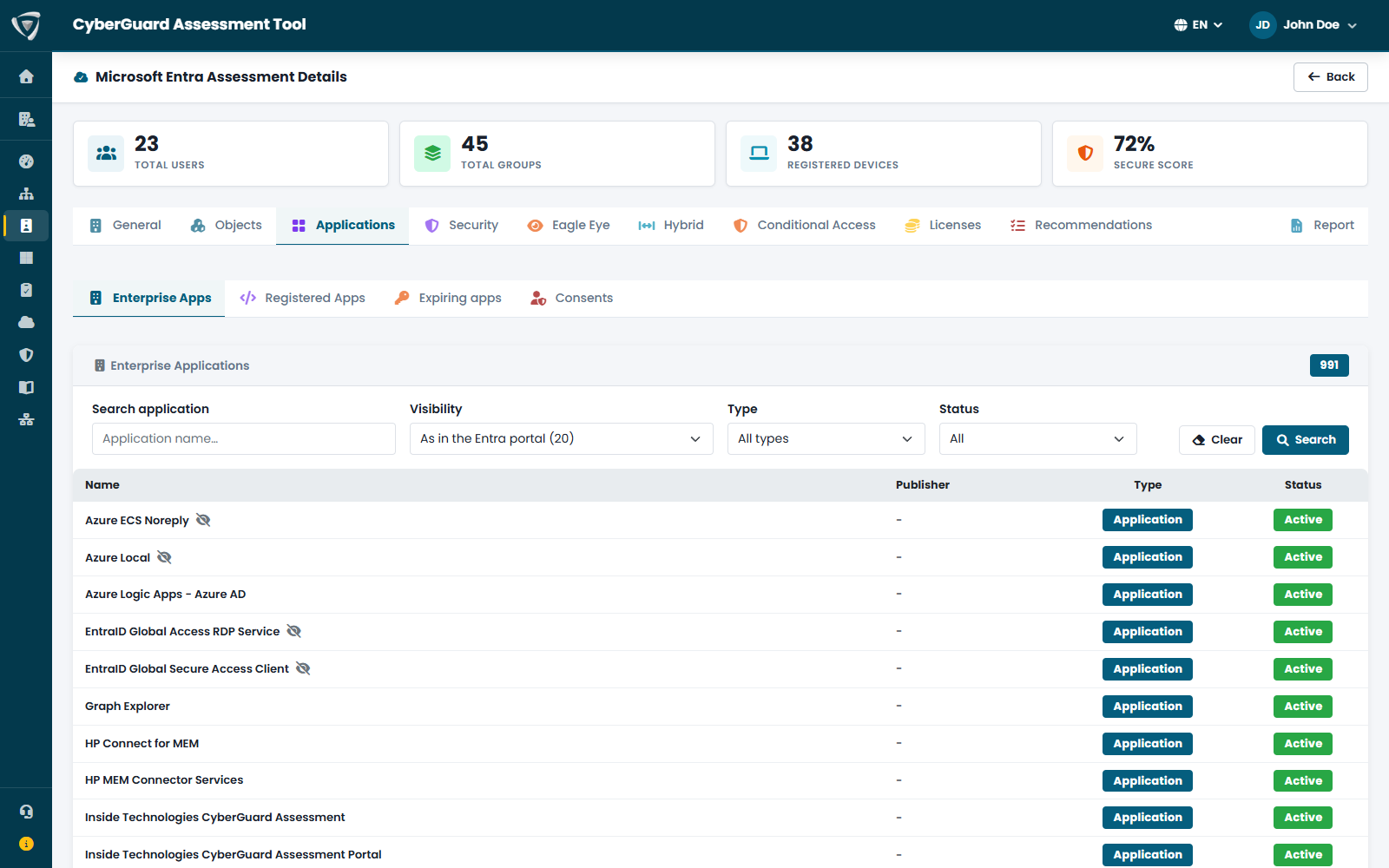
Enterprise applications and app registrations, expiring or expired secrets and certificates, consents granted to third-party applications with the risky ones highlighted. Apps with privileged application permissions are a direct route to Global Administrator.

  • Risky OAuth consents
  • Expired or expiring secrets and certificates
  • Privileged application permissions in attack paths

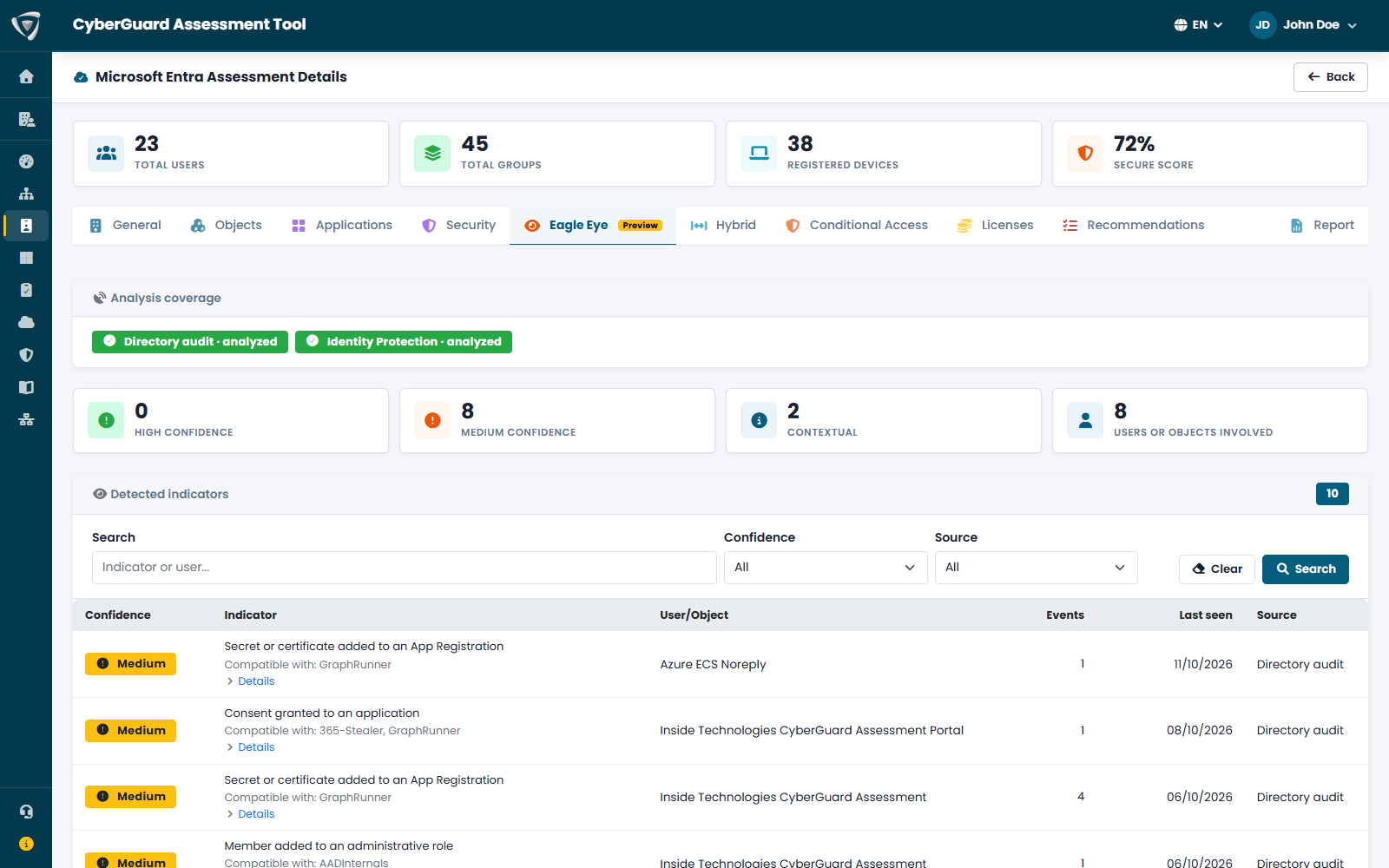
While the rest of the assessment looks at configuration, Eagle Eye looks at what happened: Entra ID Protection risk detections and the changes typical of someone trying to keep access to the tenant, such as secrets added to apps, consents and new role members.

  • Indicators with high, medium or contextual confidence
  • Matching attack tools such as GraphRunner and AADInternals
  • Tenant sign-in logs that can be synced on demand

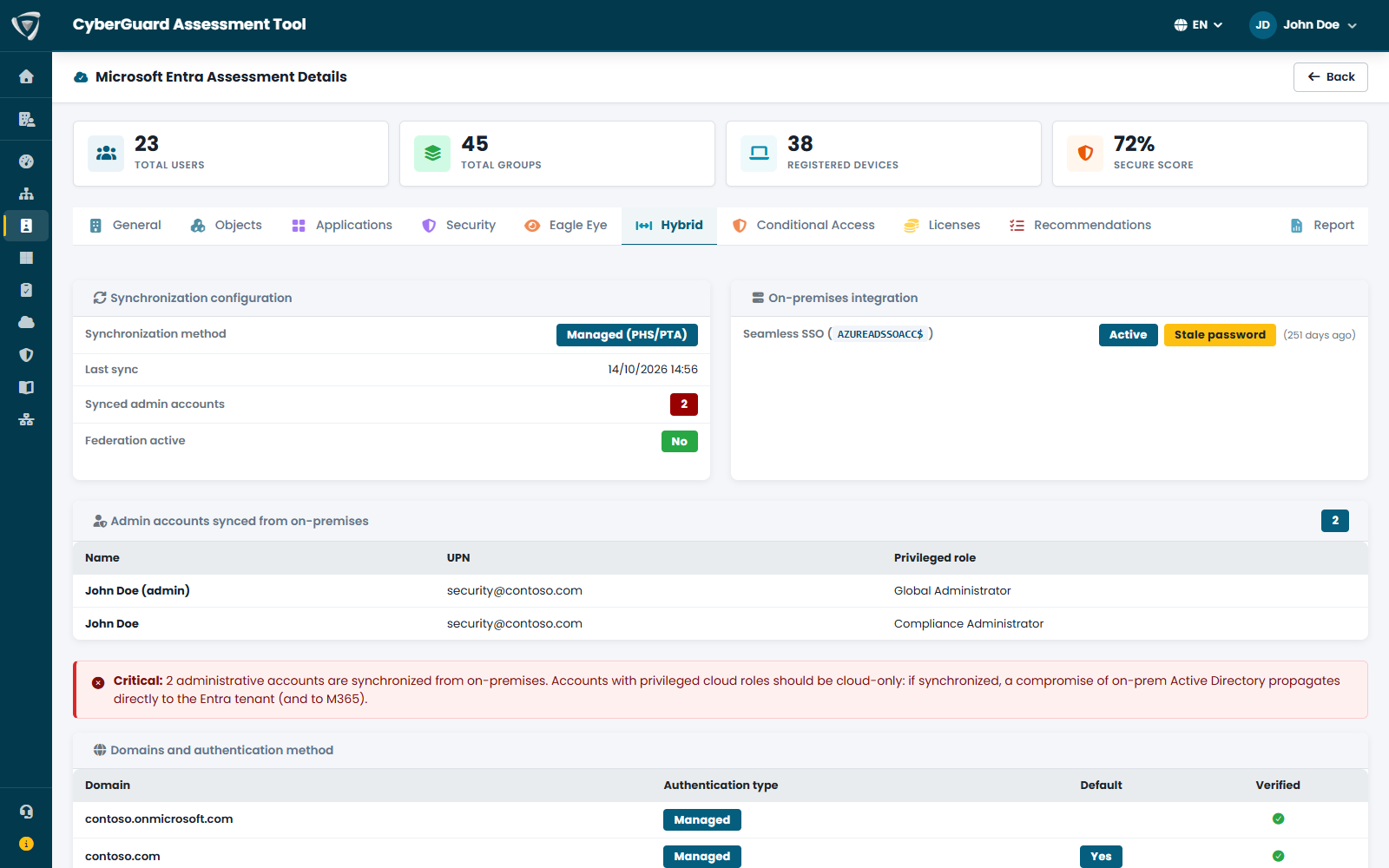
Sync method, last sync, federation, Seamless SSO key and admins synced from on-premises, who should be cloud-only. If you also run the AD assessment, CyberGuard shows the paths that lead from a compromised domain to Global Administrator.

  • Admins synced from Active Directory
  • Seamless SSO key age (AZUREADSSOACC)
  • AD → Microsoft Entra attack paths
Microsoft Entra assessment with users, groups, devices and Microsoft Secure Score Checking Conditional Access policy coverage: MFA, legacy authentication, device code flow, Token Protection Identity Secure Score, Microsoft Secure Score and MFA registration of Microsoft Entra users Enterprise applications in the Microsoft Entra tenant with type and status Eagle Eye: indicators of compromise for Microsoft Entra identities with confidence level Hybrid identity: sync, Seamless SSO with an old password and admins synced from Active Directory

Microsoft 365 security assessment

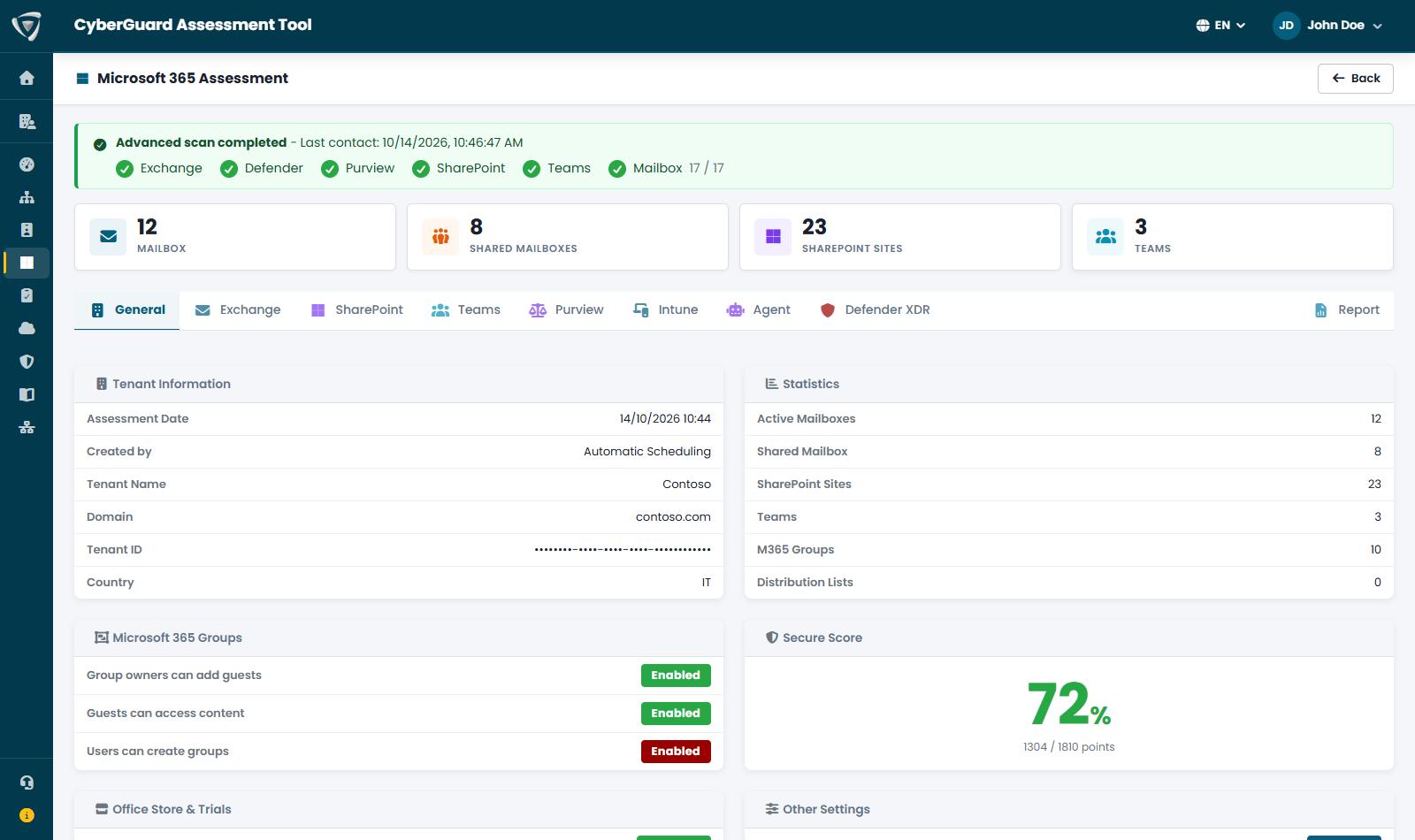
The Microsoft 365 assessment analyzes how your collaboration environment is configured: Exchange Online mail, SharePoint and OneDrive sharing, Teams, data protection with Purview, Intune devices, Copilot Studio agents and Microsoft Defender. Sections not covered by your licenses are flagged, not left blank.

Mailboxes, shared mailboxes, SharePoint sites and teams; Microsoft 365 group settings, Secure Score, Office Store and trials. Assessment progress is shown service by service.

  • Sections not included in your licenses are flagged as such
  • Intune and Defender XDR can be turned off if you don't use them
  • PDF reports and CSV export

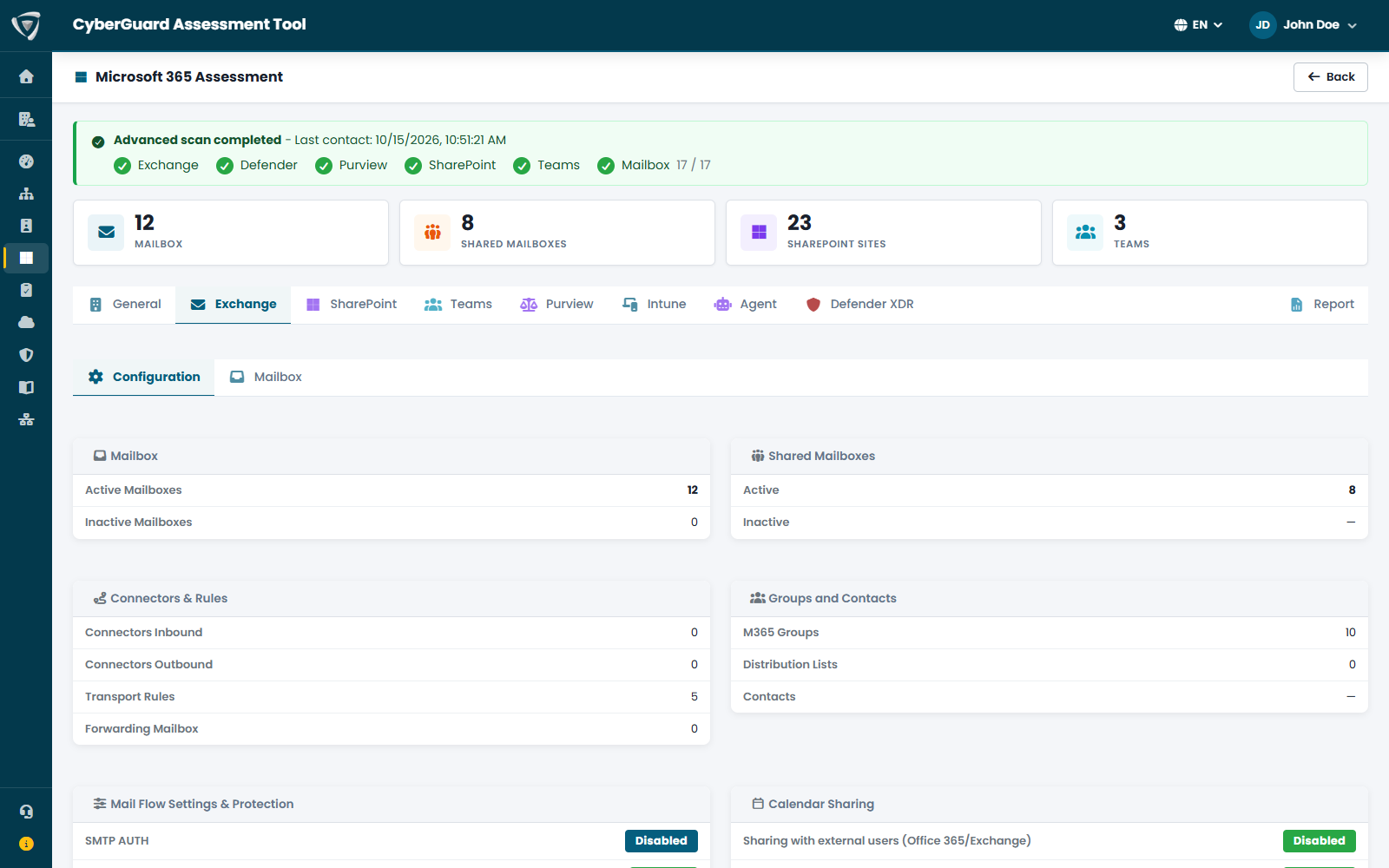
Mailboxes and shared mailboxes with sign-in enabled, connectors and transport rules, mail flow and protection settings, calendar sharing, domains, auditing and logging. Configurations that make mail exfiltration easier become findings.

  • SMTP AUTH, external forwarding and legacy TLS
  • Mailbox auditing disabled or audit bypass
  • SPF, DKIM and DMARC records for your domains

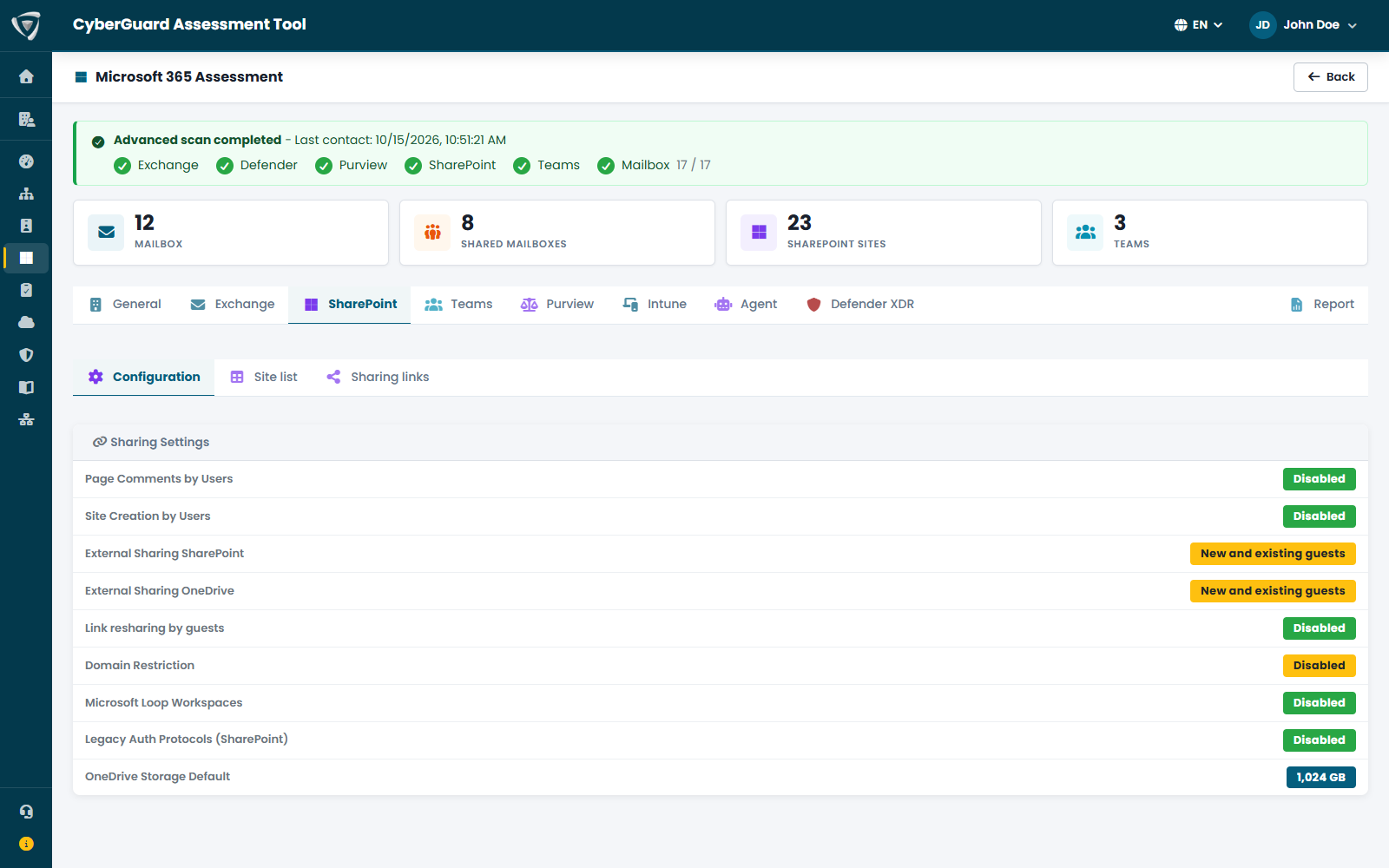
SharePoint and OneDrive external sharing settings, resharing by guests, domain restrictions and legacy protocols, along with the list of sites: where files can leave your organization.

  • External sharing for SharePoint and OneDrive
  • Resharing by guests and domain restrictions
  • Site list and legacy authentication

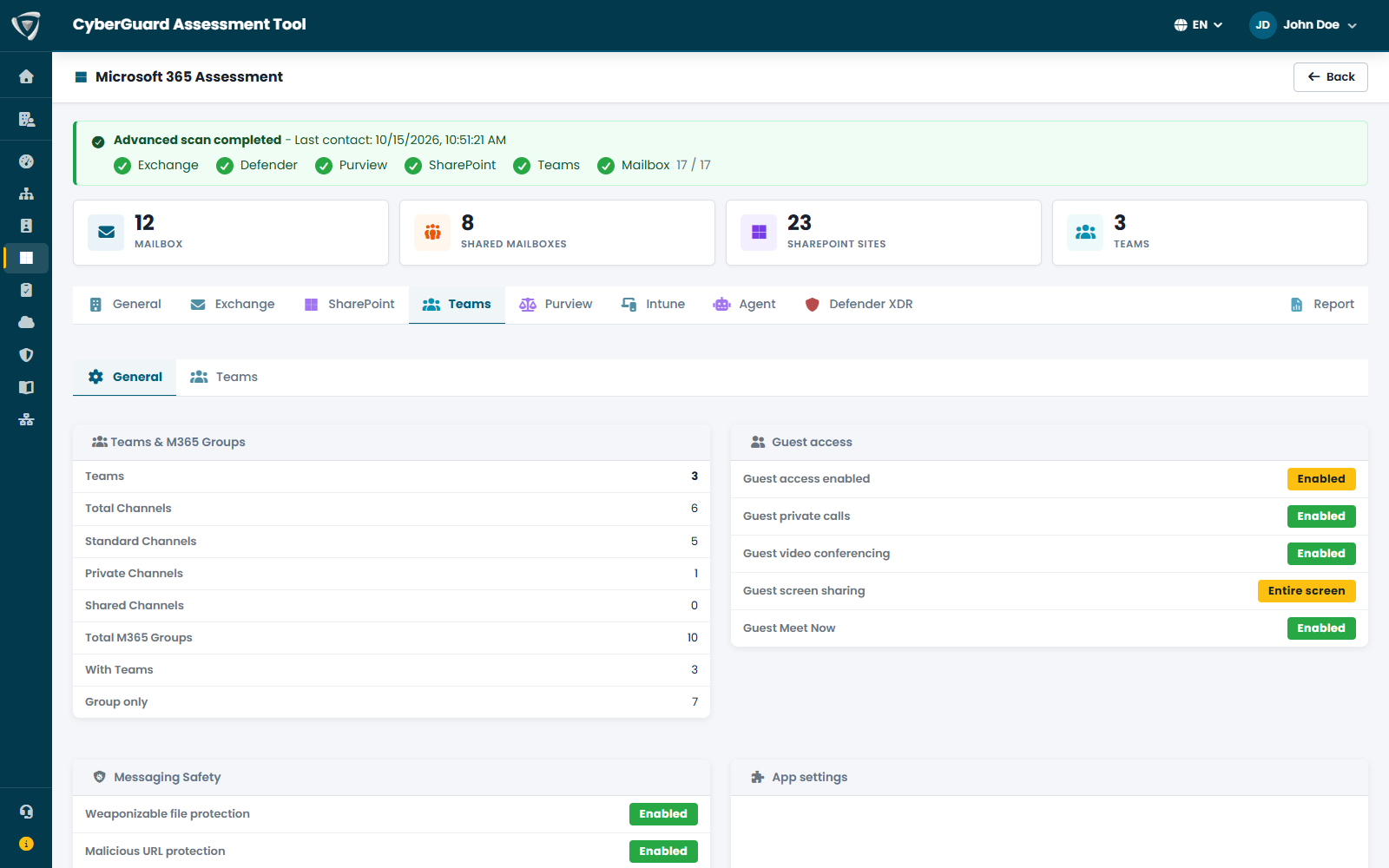
Guest access, message security, allowed apps, meetings and lobby, external file providers, Copilot and AI in meetings, voice and face recognition, and governance of Copilot Studio agents.

  • Teams global policies and third-party apps
  • Copilot and AI in meetings
  • Copilot Studio agent governance

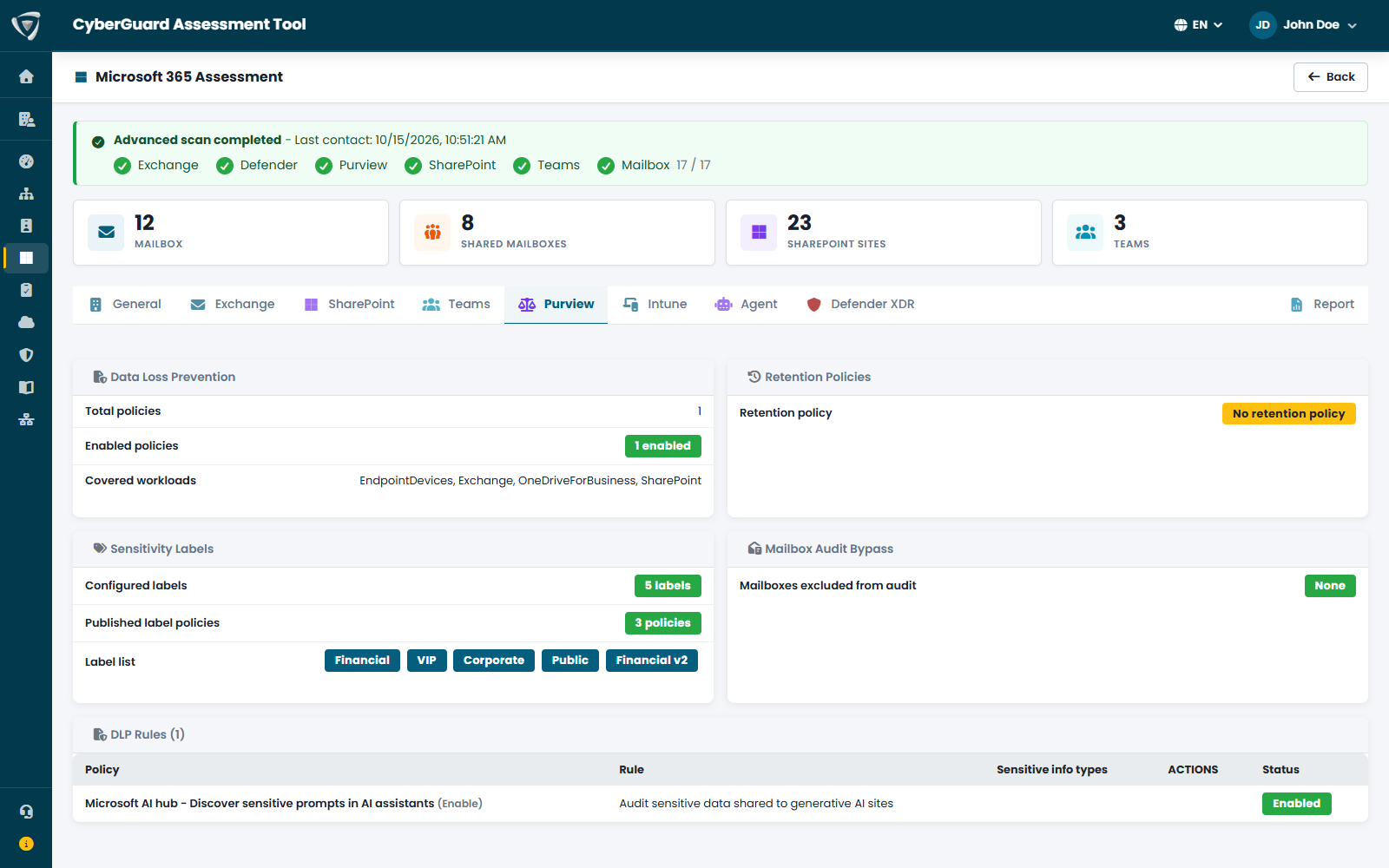
Data Loss Prevention policies and rules, retention policies, sensitivity labels and mailbox audit bypass. The data protection that NIS2 and GDPR require you to prove, verified against your actual configuration.

  • Active DLP policies and rules
  • Retention policies
  • Published sensitivity labels

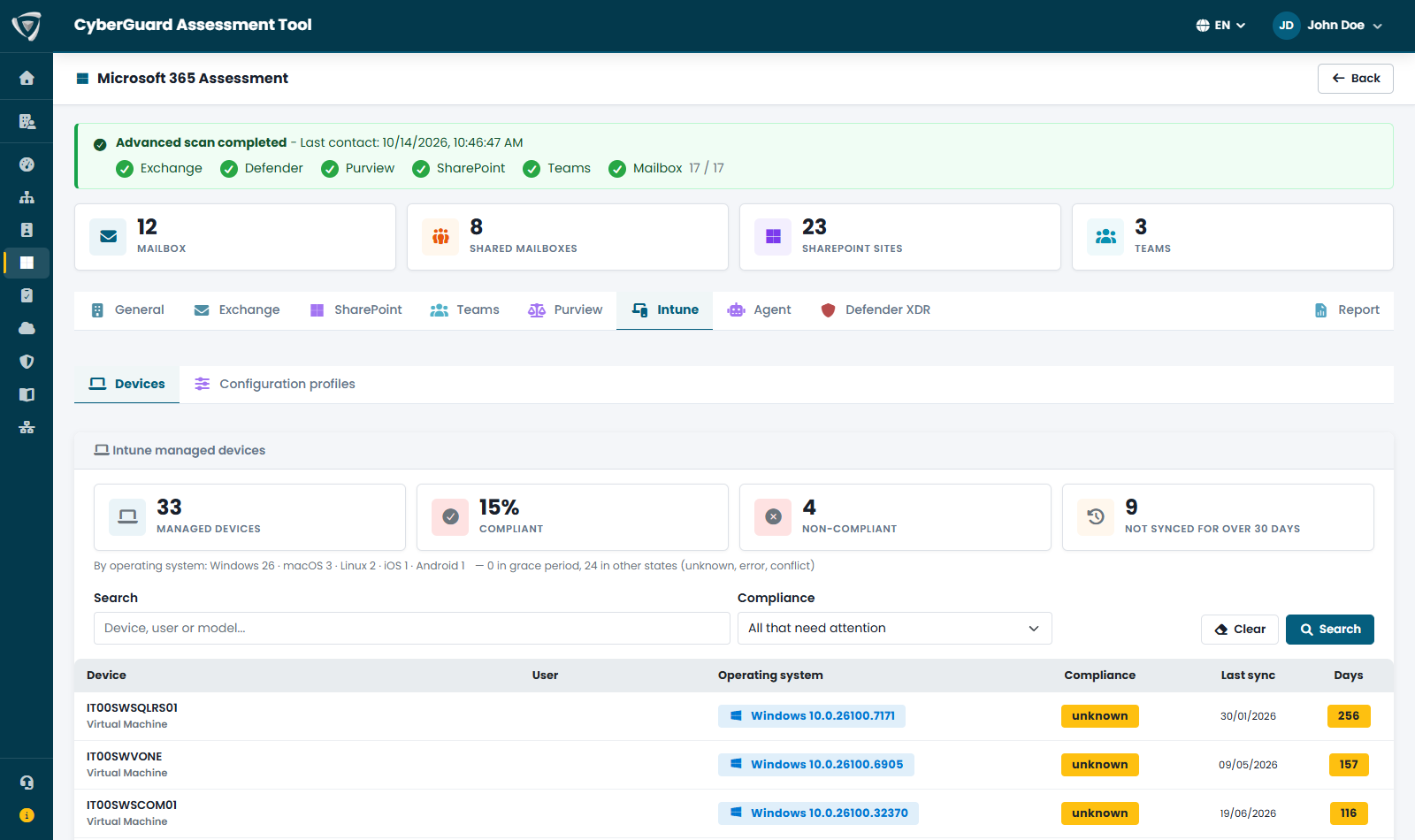
How many devices you manage, the share that are compliant, the noncompliant ones and those not synced for more than 30 days, with operating system, compliance status and days since last sync. Plus configuration profiles and their assignments.

  • Devices that need attention highlighted
  • Configuration profiles and assignments
  • Noncompliant devices as findings

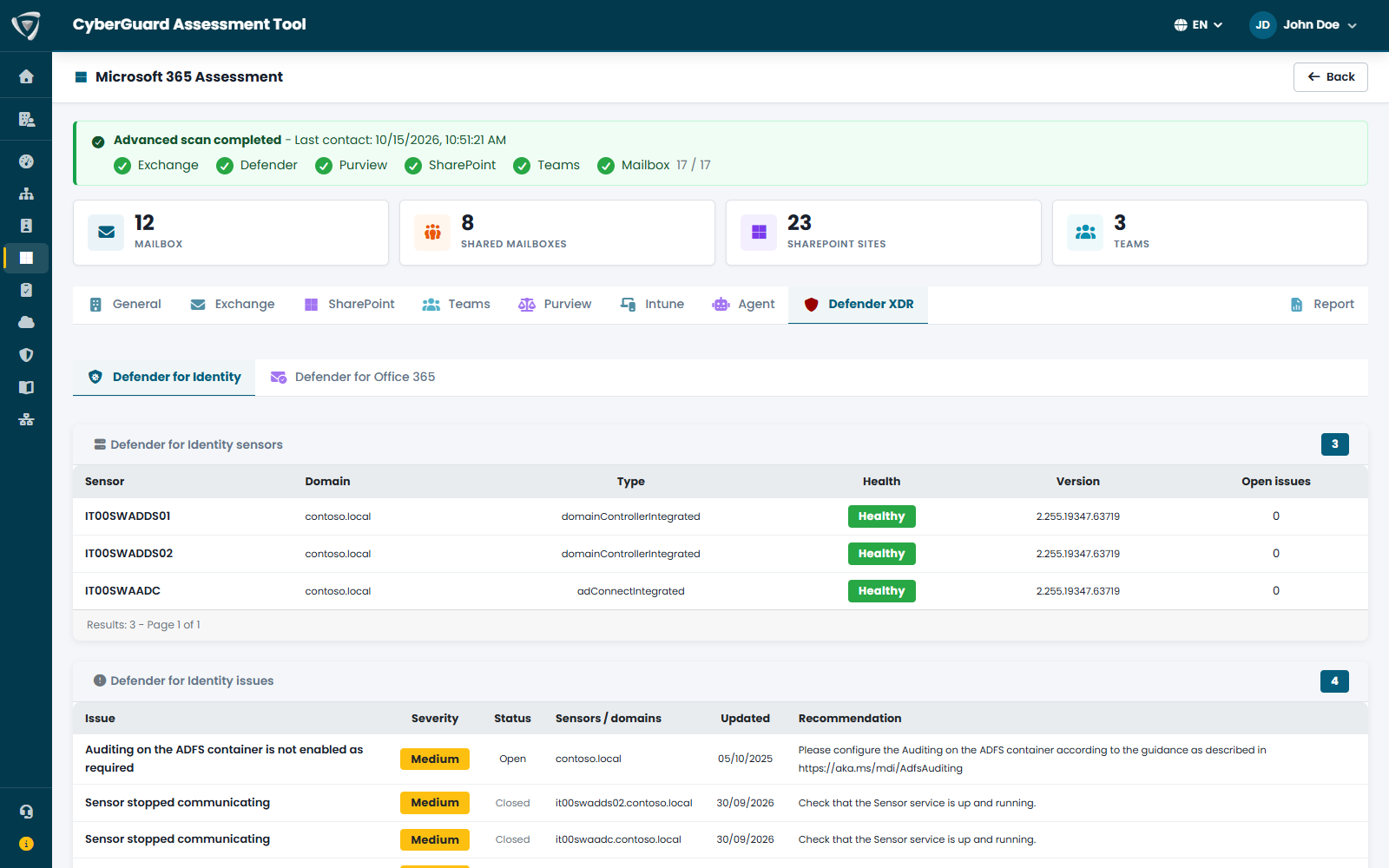
Microsoft Defender for Identity sensors and their health issues, Defender for Office 365 policies: anti-phishing, anti-spam, anti-malware, Safe Links and Safe Attachments, Tenant Allow/Block List.

  • Unhealthy MDI sensors
  • Anti-phishing and Safe Links policies
  • Tenant Allow/Block List
Microsoft 365 assessment with mailboxes, SharePoint sites, teams and Secure Score Exchange Online configuration: mailboxes, connectors, transport rules, forwarding and SMTP AUTH SharePoint and OneDrive external sharing settings Microsoft Teams settings: guest access, channels and message protection Microsoft Purview: DLP policies, retention, sensitivity labels and mailbox auditing Devices managed with Microsoft Intune: compliance, operating system and last sync Microsoft Defender for Identity sensors with health status and open issues

Compliance assessment for NIS2, DORA and GDPR

Technical assessments tell you how systems are configured. Regulations ask for more: processes, roles and controls. CyberGuard turns legal text into concrete questions, one regulation at a time, and returns a readiness report area by area. It is an indicative evaluation: it does not replace legal advice or a certified audit.

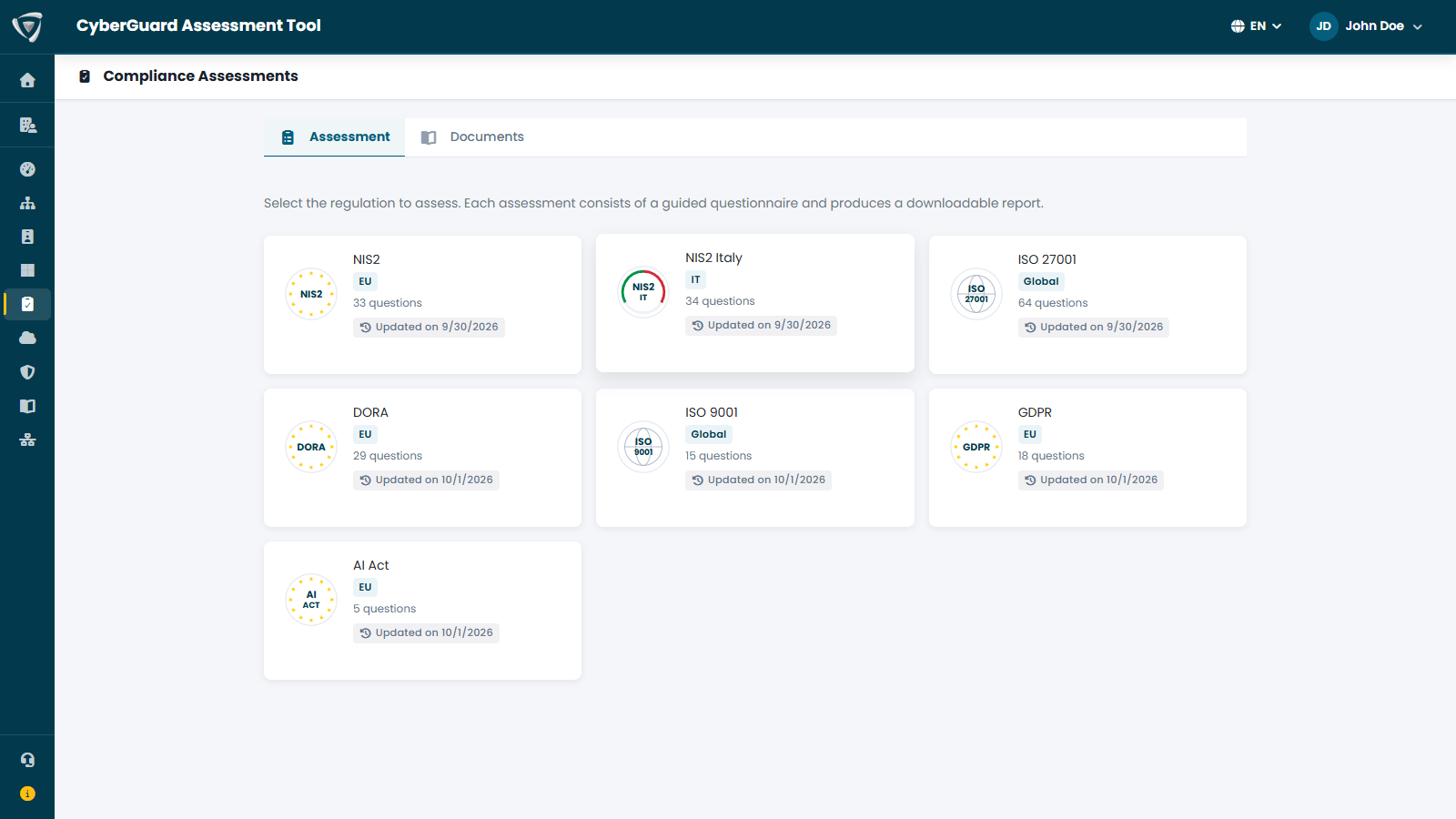
Guided questionnaires for NIS2, NIS2 Italy with the obligations of the Italian National Cybersecurity Agency (ACN), DORA, GDPR, AI Act, ISO/IEC 27001 and ISO 9001. Each card shows scope, number of questions and last update date.

  • European and national regulations, and international standards
  • Assessment history for each regulation
  • Report comparison over time

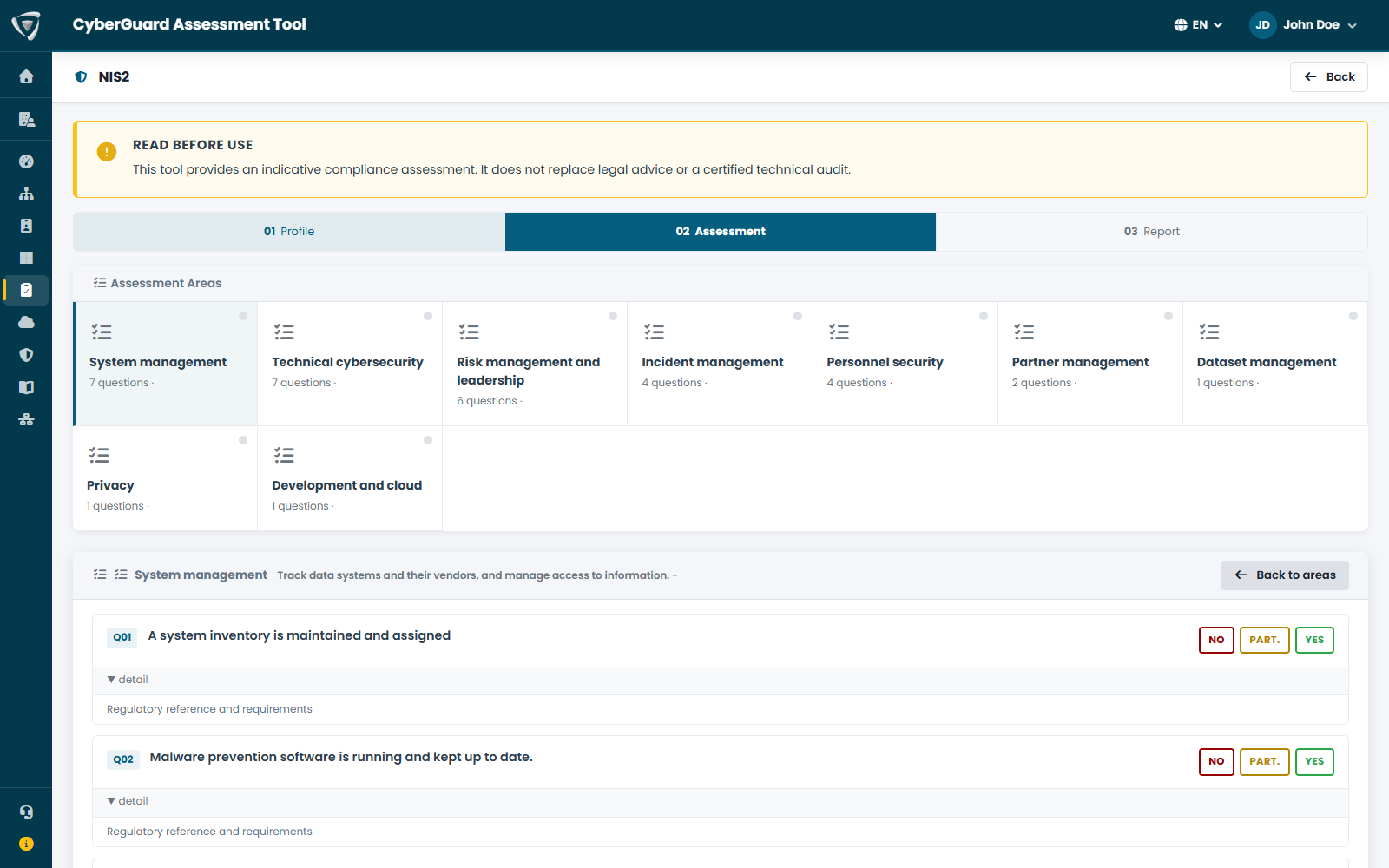
First, a few questions to establish whether and how the regulation applies to you; then questions grouped by area — systems management, incidents, personnel security, suppliers — answered No, Partial or Yes; finally the readiness level and the gaps to close.

  • Overall and per-area readiness level
  • Gaps to close highlighted
  • Downloadable report

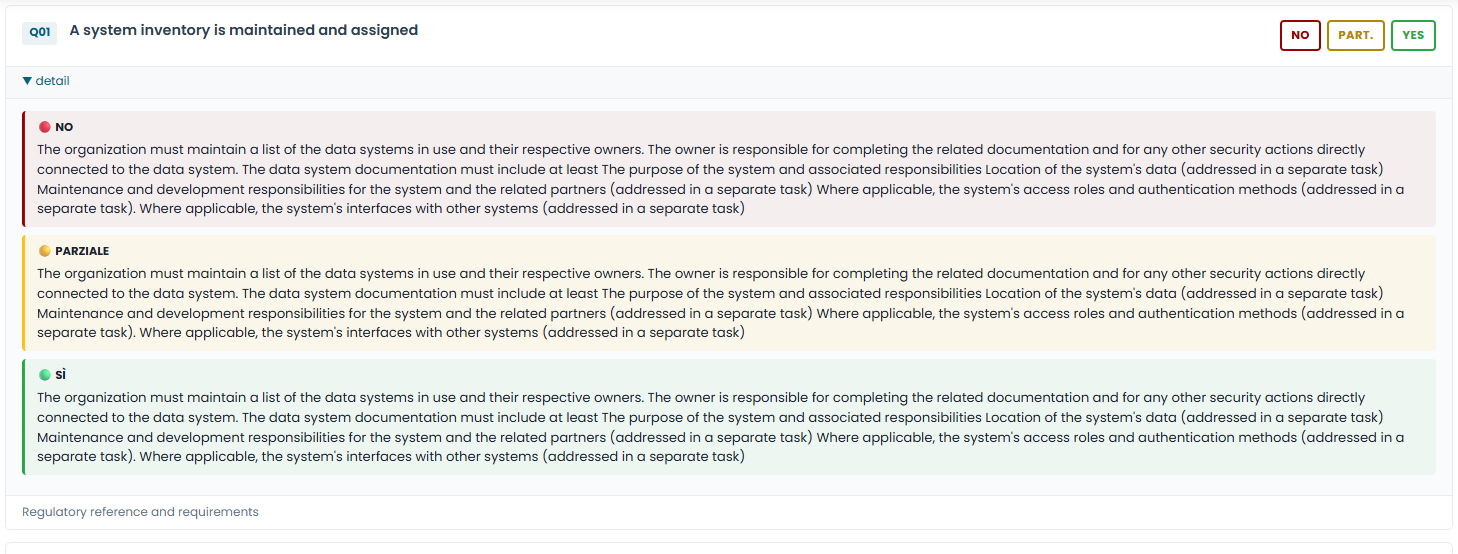
You don't need to know the regulation by heart. Under each question you will find what No, Partial and Yes mean in practice, the article the question comes from and the requirements it sets. Every gap in the report stays tied to the legal text.

  • Consistent answers across people and over time
  • Legal reference and requirements for each question
  • Easier to explain why a control is needed

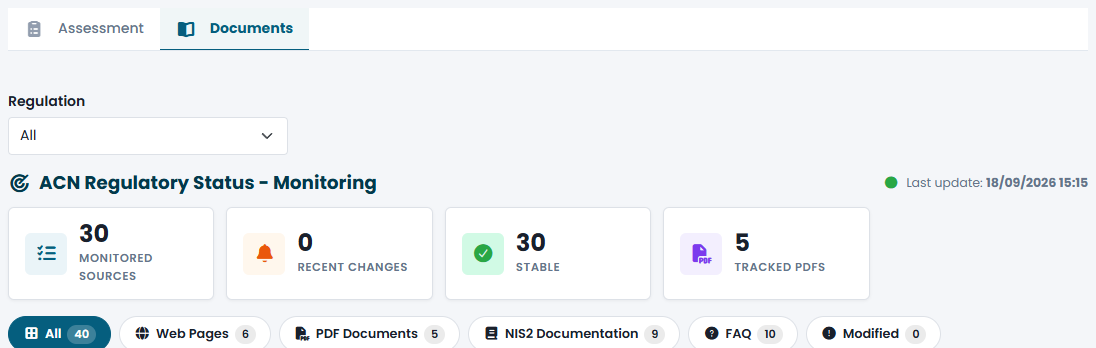
Legal texts, authority guidelines, FAQs and reference documents, filterable by regulation and type. For NIS2 in Italy, CyberGuard monitors ACN publications and flags the sources that have recently changed.

  • Monitored and recently changed sources
  • Tracked PDF documents
  • "Changed" filter to see only what's new

Many requirements — access control, MFA, logging, backup, vulnerability management — are verified in practice by the Active Directory, Microsoft Entra and Microsoft 365 assessments. Planned actions are recorded in the Workspace, Compliance area.

  • Technical evidence supporting the questionnaire
  • Compliance actions tracked in the Workspace
  • Repeatable reports to show progress
Available compliance questionnaires: NIS2, NIS2 Italy ACN, DORA, GDPR, AI Act, ISO 27001, ISO 9001 NIS2 compliance questionnaire with questions by area and No, Partial, Yes answers Questionnaire question with legal reference to the NIS2 article and requirements Monitoring of ACN regulatory sources for NIS2 in Italy with changed documents Compliance activities tracked in the CyberGuard Workspace

Network Assessment

Network Assessment completes the picture with the devices that aren't in Active Directory or Intune: switches, firewalls, access points, printers, NAS, cameras, hypervisors. It finds every device that responds, the services it exposes and the vulnerabilities in its firmware.

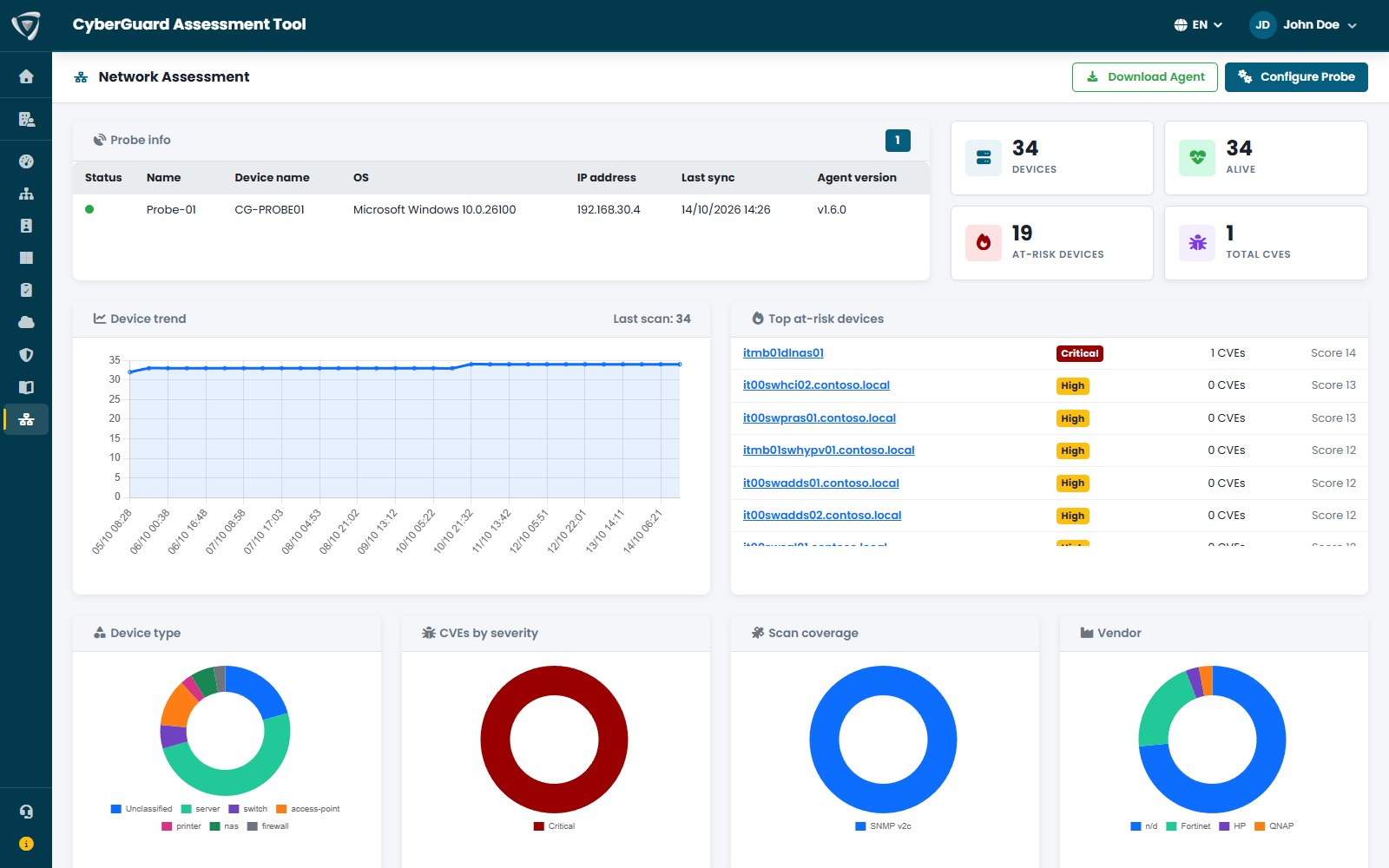
Devices found, active and at risk, CVE vulnerabilities; trends over time and the highest-risk devices. Charts by type, vendor and site, scan coverage and most exposed ports.

  • Filters by type and site
  • Vendor, model, firmware, IP, risk and ports
  • Devices no longer seen shown in gray with the date

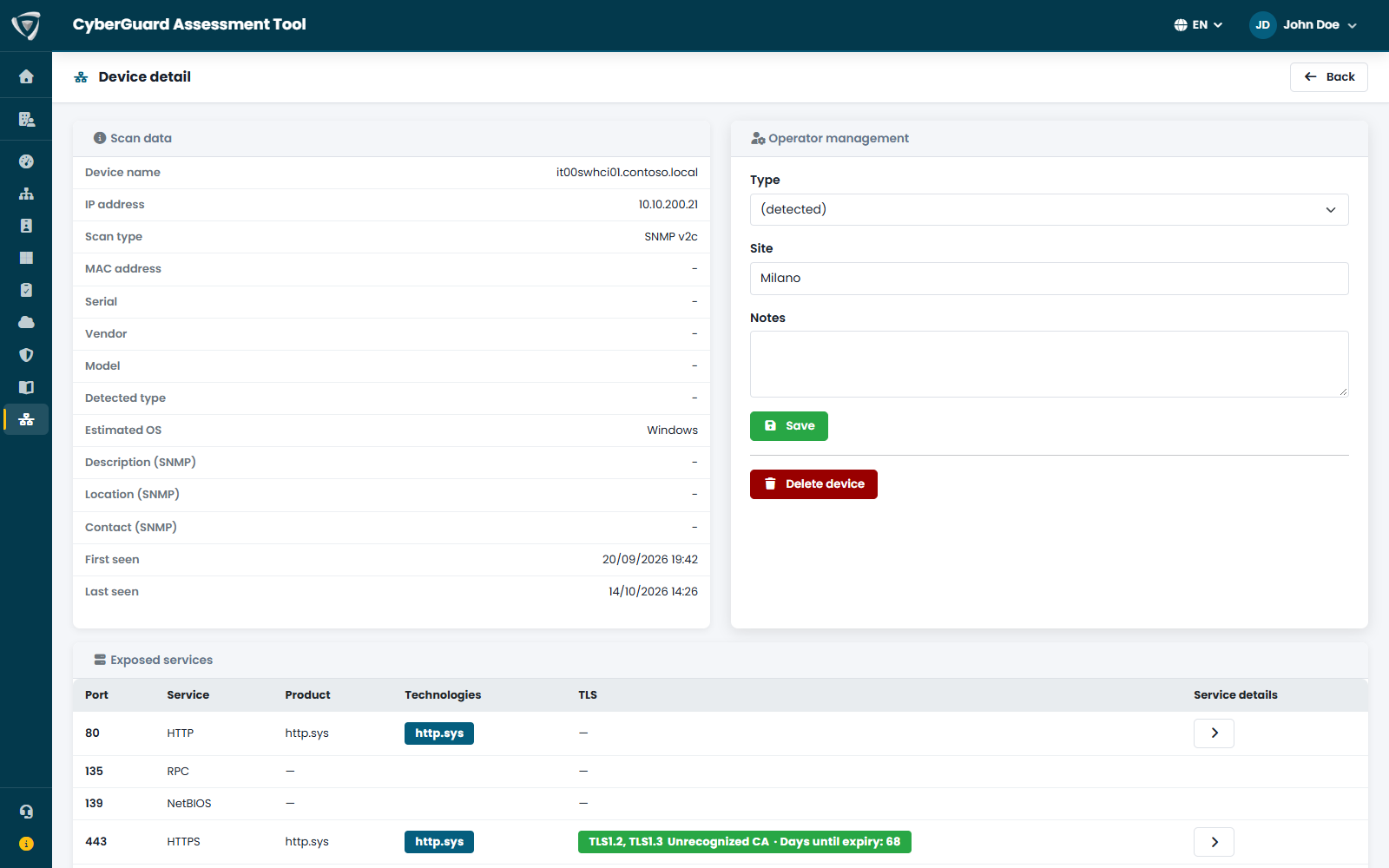
What was detected — name, IP and MAC, vendor, model, firmware, operating system, first and last seen — plus operator management: correct type, site and notes.

  • Exposed services and findings
  • Known firmware CVEs
  • Notes and site assigned by the team

For each device, CyberGuard identifies the vendor, model and firmware version and keeps only the public CVEs whose vulnerable version range actually includes that firmware. Every scan reconfirms the result.

  • CVEs with CVSS score and severity
  • Device-to-vulnerability match confidence
  • After a firmware update, CVEs that no longer apply disappear

CyberGuard detects open ports and analyzes the services behind them: protocols, web admin interfaces, TLS certificates and their expiration. Misconfigured services become network findings.

  • Cleartext protocols and exposed interfaces
  • Expired or expiring TLS certificates
  • Exposed services for each device

Misconfigured services and exposures become findings with severity and remediation, and count toward the Security Score along with those from Active Directory, Microsoft Entra and Microsoft 365.

  • Findings by severity
  • Recommended remediation
  • Can be documented in the Workspace, Networking area
Network Assessment with network device inventory, risk, CVEs and exposed ports Network device details with detected data, exposed services, findings and CVEs Known CVEs of a network device with CVSS score, severity and confidence Exposed services of a network device with ports, protocols and TLS certificates Network findings with severity and recommended remediation for exposed services
And more

Capabilities across the entire portal

Detailed PDF reports

For each assessment, a report with score, findings, action plan and accepted risks, ready for the customer or the audit. CSV export of all lists.

Users, roles and permissions

Granular permissions by user and group: who can view, run, export or administer.

Notifications from your own mail server

Completed or failed scheduled assessments and the weekly Workspace summary: emails are sent from your own mail server.

Audit Log

Who did what in the portal and when, including changes to users and permissions, with filters by period, object, action and customer.

Plans

Choose the right plan for your needs

Annual pricing, excluding VAT.

Free

No cost

Stored assessments per type
3
Active Directory domains
1
Microsoft Entra / 365 tenants
1
Customers
1
  • Active Directory, Microsoft Entra and Microsoft 365 overview
  • Compliance questionnaire overview
  • Basic PDF report

Basic

€1,000 / year

Stored assessments per type
3
Active Directory domains
1
Microsoft Entra / 365 tenants
—
Customers
1
  • Complete Active Directory assessment
  • Security Score and findings
  • Attack paths, what changed and accepted risks
  • Compliance questionnaires with assessment comparison
  • Complete PDF reports and CSV export

Advanced

€2,500 / year

Stored assessments per type
15
Active Directory domains
1
Microsoft Entra / 365 tenants
1
Customers
1

Everything in Basic, plus:

  • Complete Microsoft Entra and Microsoft 365 assessment
  • Microsoft Security View: incidents, vulnerabilities and KQL queries
  • Workspace
  • Scheduled assessments and email notifications

Enterprise

On request

Stored assessments per type
15 per customer
Active Directory domains
Unlimited
Microsoft Entra / 365 tenants
Unlimited
Customers
Unlimited

Everything in Advanced, plus:

  • Multi-customer management
Add-on

Network Assessment

Network device inventory, exposed services, firmware vulnerabilities and network findings.

Paid add-on, available per customer for the Advanced and Enterprise plans.

Frequently asked questions

Frequently asked questions

Where is the data stored?

On Microsoft Azure, in data centers in Italy (Italy North region).

Which environments does CyberGuard Assessment Tool analyze?

On-premises Active Directory, Microsoft Entra and Microsoft 365: Exchange Online, SharePoint, OneDrive, Teams, Purview, Intune and Defender. With the Network Assessment add-on it also analyzes network devices such as switches, firewalls, access points, printers and NAS.

How is the Security Score calculated?
Every check that finds a problem becomes a finding with severity, CVSS score and recommended remediation. Findings count toward a score from 0 to 100 for each technology, with a rating from 0 to 10 for each area, so you can see right away where the score drops and what to fix first.
Does the assessment change anything in my environment?

No. CyberGuard agents only read: they never change the configuration of your domain or tenant. The remediation simulation changes nothing either, and Microsoft Defender data and KQL queries are read-only.

Ready to see what's inside your infrastructure?

Request a guided demo or talk to our team.

Request a demo